Period-over-period comparisons
Compare a metric against its previous period, and the ways Qyra can calculate the shift
Period comparison (beta)
This feature is currently in beta.
We're actively testing and improving it.
We've made significant improvements to how you generate period-over-period comparisons. You can now customize a PoP metric's series type, label, show value labels, and more.
To add a period comparison:
- Select a time/date dimension
- Select a metric
- On the results table, click on a metric's column and select Add period comparison
- Choose the time dimension and offset, then hit save
- Add the generated metric to your chart
You can also ask an AI agent for comparisons in natural language — for example, "compare revenue to last month" or "year-over-year orders by week".
Watch a walkthrough of the new period comparison experience:
Period-over-period analysis is one of the most common ways to evaluate how metrics change over time. Whether you're looking at month-over-month growth, year-over-year comparisons, or week-over-week performance, Qyra makes it easy to build these analyses directly in your dashboards.
This guide walks through several examples of how to build period-over-period comparisons manually using chart types, table calculations, and parameters. You can also watch the manual walkthrough video below if you'd prefer a visual demo.
Big Value Charts: Simple Comparisons
The fastest way to get started is with the Big Value chart type.
Month-over-month
- Pull two months of data.
- Use the Big Value chart and select Compare to previous row
- Qyra automatically shows the comparison.
That's it!
Same month, previous Year
- Pull ~13 months of data with
MONTHandMONTH_NUMtime dimensions and your metric. - Create a table calculation to filter only the current month and the same month last year:
(extract(month from current_date) - 1) = ${tracks.timestamp_month_num}This table calculation relies on the MONTH_NUM time interval.
- Filter where the value of this table calculation is
true. - Then use the Big Value chart with Compare to previous row
Trend line comparisons
Sometimes you need more than a single value—you want to see how trends evolve.
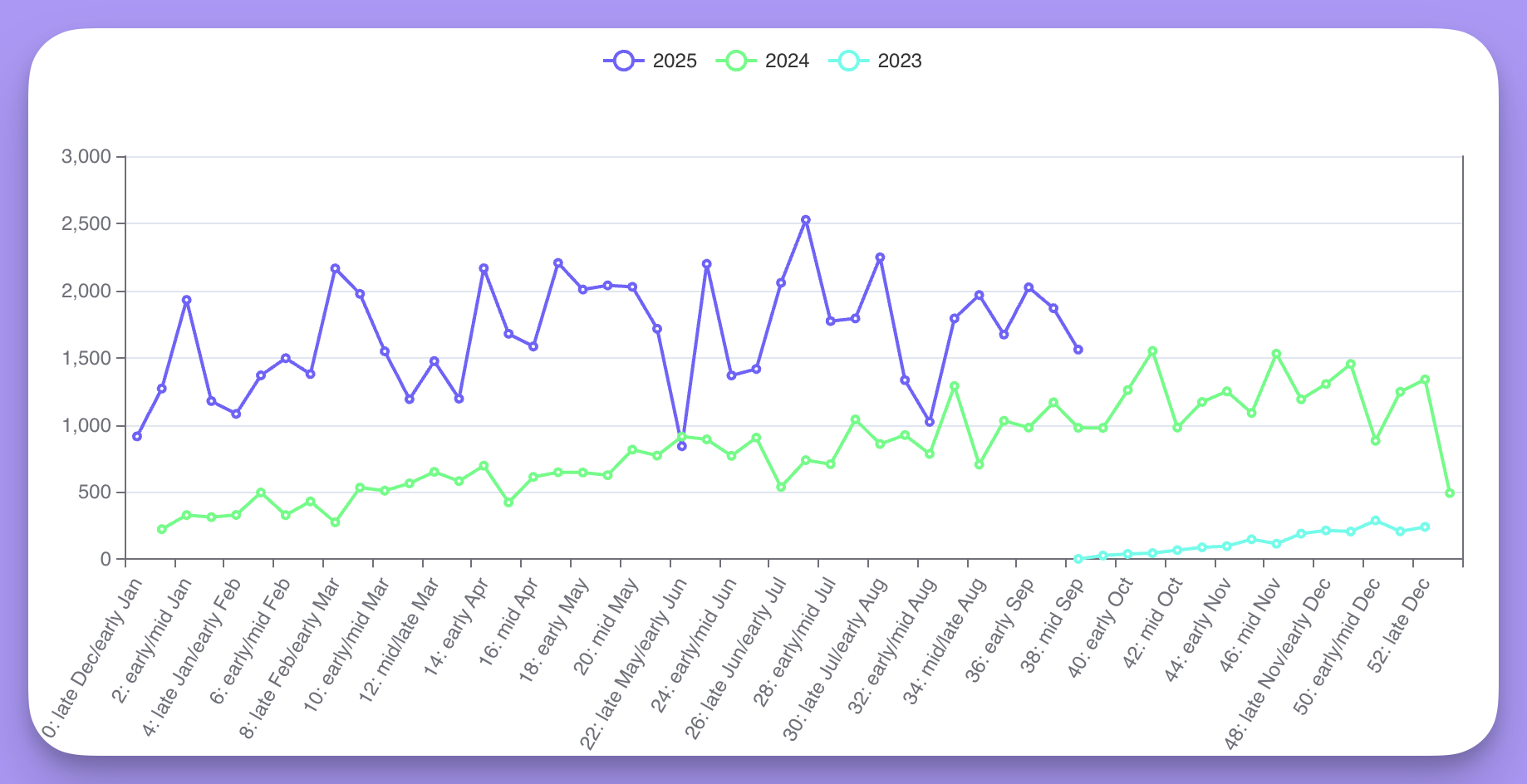
By week of year
- Add week of year time dimension (1-52) on the X-axis.
- Plot the metric (e.g.
event_count). - Group by year.
- This allows you to compare trends across years.
Check minute 1:45 in the Loom video for an example.
By day of month with running totals
- Compare June vs July (or any two months).
- Use day of month time dimension (1-31) on the X-axis, grouped by month.
- Add a running total table calculation.
- Optionally, use bars in the background to show cumulative progress.
Check minute 2:30 in the Loom video for an example.
Compare arbitrary weeks
You can also compare arbitrary weeks side by side.
- Select specific weeks (e.g. 2, 8, 12).
- Use week of year as the grouping dimension.
- Apply a running total to see how each week accumulates.
- This shows how different weeks trend across the same range.
Check minute 3:00 in the Loom video for an example.
Year-over-year by month
For a full year-over-year comparison across months:
- Pull two years worth of monthly data.
- Add a formula table calculation that uses the
LAGwindow function to pull the same month last year, offset by 12 rows:=LAG(event_count, 12). - Add a second formula for the percent change, following the period-over-period growth pattern:
=(event_count - LAG(event_count, 12)) / LAG(event_count, 12) * 100. - Filter out rows where the previous year's value is
null.
Check minute 3:45 in the Loom video for an example.
Using parameters for period-over-period analysis
Parameters let you create dynamic period-over-period comparisons in your charts and dashboards.
Users can easily toggle between different date ranges to see how metrics are tracking over time — no need to rebuild charts or manually adjust filters. For more on working with parameters, check out our parameters reference guide.
This guide walks through an example of how to do period-over-period analysis in Qyra using parameters, alternatively you can watch our demo tutorial below.
Say you want users to select a time period like yesterday, last 7 days, or last 30 days, and then compare the current period to both the previous period and the same period a year ago.
To do this, you:
Date range period parameter syntax
models:
  - name: dbt_orders
    description: 'This table contains information on all the confirmed orders and their status'
    meta:
      parameters:
        date_range:
          label: "Date Range"
          description: "Choose a date range"
          options:
            - "yesterday"
            - "last 7 days"
            - "last 30 days"
default: "last 7 days"models:
- name: dbt_orders
description: 'This table contains information on all the confirmed orders and their status'
config:
meta:
parameters:
date_range:
label: "Date Range"
description: "Choose a date range"
options:
- "yesterday"
- "last 7 days"
- "last 30 days"
default: "last 7 days"type: model
name: dbt_orders
description: 'This table contains information on all the confirmed orders and their status'
parameters:
date_range:
label: "Date Range"
description: "Choose a date range"
options:
- "yesterday"
- "last 7 days"
- "last 30 days"
default: "last 7 days"You can also take a look at the Date Range parameter setup in our demo dbt project here.
Next, you need to create an additional dimension inside the dbt_orders model that calculates the period selected in the date_range parameter using conditional case statements.
Additional dimension syntax
models:
 - name: dbt_orders
   description: 'This table contains information on all the confirmed orders and their status'
   meta:
     parameters:
       date_range:
         label: "Date Range"
         description: "Choose a date range"
         options:
           - "yesterday"
           - "last 7 days"
           - "last 30 days"
         default: "last 7 days"
     label: Orders
   columns:
     - name: order_date
       description: 'Timestamp of order placement by user.'
       meta:
         dimension:
           time_intervals: [
             'HOUR', 'MINUTE_OF_HOUR_NUM', 'HOUR_OF_DAY_NUM',
             'DAY', 'DAY_OF_WEEK_INDEX', 'DAY_OF_MONTH_NUM', 'DAY_OF_YEAR_NUM',
             'DAY_OF_WEEK_NAME', 'WEEK', 'WEEK_NUM',
             'MONTH', 'MONTH_NUM', 'MONTH_NAME',
             'QUARTER', 'QUARTER_NUM', 'QUARTER_NAME',
             'YEAR' ]
           type: timestamp
         additional_dimensions:
           order_date_period:
             description: Date period (current period or previous period or previous year or out of range) chosen by the date_range parameter
             type: string
             sql: >
               case
                 -- current period
                 when (
                   (${qyra.parameters.dbt_orders.date_range} = 'yesterday' and date(${order_date}) = date_sub(current_date(), interval 1 day)) or
                   (${qyra.parameters.dbt_orders.date_range} = 'last 7 days' and date(${order_date}) between date_sub(current_date(), interval 7 day) and date_sub(current_date(), interval 1 day)) or
                   (${qyra.parameters.dbt_orders.date_range} = 'last 30 days' and date(${order_date}) between date_sub(current_date(), interval 30 day) and date_sub(current_date(), interval 1 day))
                 )
                 then 'current period'

                 -- previous period
                 when (
                   (${qyra.parameters.dbt_orders.date_range} = 'yesterday' and date(${order_date}) = date_sub(current_date(), interval 2 day)) or
                   (${qyra.parameters.dbt_orders.date_range} = 'last 7 days' and date(${order_date}) between date_sub(current_date(), interval 14 day) and date_sub(current_date(), interval 8 day)) or
                   (${qyra.parameters.dbt_orders.date_range} = 'last 30 days' and date(${order_date}) between date_sub(current_date(), interval 60 day) and date_sub(current_date(), interval 31 day))
                 )
                 then 'previous period'

                 -- previous year
                 when (
                   (${qyra.parameters.dbt_orders.date_range} = 'yesterday' and date(${order_date}) = date_sub(date_sub(current_date(), interval 1 year), interval 1 day)) or
                   (${qyra.parameters.dbt_orders.date_range} = 'last 7 days' and date(${order_date}) between date_sub(date_sub(current_date(), interval 1 year), interval 7 day) and date_sub(date_sub(current_date(), interval 1 year), interval 1 day)) or
                   (${qyra.parameters.dbt_orders.date_range} = 'last 30 days' and date(${order_date}) between date_sub(date_sub(current_date(), interval 1 year), interval 30 day) and date_sub(date_sub(current_date(), interval 1 year), interval 1 day))
                 )
                 then 'previous year'

                 else 'out of range'
endmodels:
- name: dbt_orders
description: 'This table contains information on all the confirmed orders and their status'
config:
meta:
parameters:
date_range:
label: "Date Range"
description: "Choose a date range"
options:
- "yesterday"
- "last 7 days"
- "last 30 days"
default: "last 7 days"
label: Orders
columns:
- name: order_date
description: 'Timestamp of order placement by user.'
config:
meta:
dimension:
time_intervals: [
'HOUR', 'MINUTE_OF_HOUR_NUM', 'HOUR_OF_DAY_NUM',
'DAY', 'DAY_OF_WEEK_INDEX', 'DAY_OF_MONTH_NUM', 'DAY_OF_YEAR_NUM',
'DAY_OF_WEEK_NAME', 'WEEK', 'WEEK_NUM',
'MONTH', 'MONTH_NUM', 'MONTH_NAME',
'QUARTER', 'QUARTER_NUM', 'QUARTER_NAME',
'YEAR' ]
type: timestamp
additional_dimensions:
order_date_period:
description: Date period (current period or previous period or previous year or out of range) chosen by the date_range parameter
type: string
sql: >
case
-- current period
when (
(${qyra.parameters.dbt_orders.date_range} = 'yesterday' and date(${order_date}) = date_sub(current_date(), interval 1 day)) or
(${qyra.parameters.dbt_orders.date_range} = 'last 7 days' and date(${order_date}) between date_sub(current_date(), interval 7 day) and date_sub(current_date(), interval 1 day)) or
(${qyra.parameters.dbt_orders.date_range} = 'last 30 days' and date(${order_date}) between date_sub(current_date(), interval 30 day) and date_sub(current_date(), interval 1 day))
)
then 'current period'
-- previous period
when (
(${qyra.parameters.dbt_orders.date_range} = 'yesterday' and date(${order_date}) = date_sub(current_date(), interval 2 day)) or
(${qyra.parameters.dbt_orders.date_range} = 'last 7 days' and date(${order_date}) between date_sub(current_date(), interval 14 day) and date_sub(current_date(), interval 8 day)) or
(${qyra.parameters.dbt_orders.date_range} = 'last 30 days' and date(${order_date}) between date_sub(current_date(), interval 60 day) and date_sub(current_date(), interval 31 day))
)
then 'previous period'
-- previous year
when (
(${qyra.parameters.dbt_orders.date_range} = 'yesterday' and date(${order_date}) = date_sub(date_sub(current_date(), interval 1 year), interval 1 day)) or
(${qyra.parameters.dbt_orders.date_range} = 'last 7 days' and date(${order_date}) between date_sub(date_sub(current_date(), interval 1 year), interval 7 day) and date_sub(date_sub(current_date(), interval 1 year), interval 1 day)) or
(${qyra.parameters.dbt_orders.date_range} = 'last 30 days' and date(${order_date}) between date_sub(date_sub(current_date(), interval 1 year), interval 30 day) and date_sub(date_sub(current_date(), interval 1 year), interval 1 day))
)
then 'previous year'
else 'out of range'
endtype: model
name: dbt_orders
description: 'This table contains information on all the confirmed orders and their status'
label: Orders
parameters:
date_range:
label: "Date Range"
description: "Choose a date range"
options:
- "yesterday"
- "last 7 days"
- "last 30 days"
default: "last 7 days"
dimensions:
- name: order_date
description: 'Timestamp of order placement by user.'
type: timestamp
time_intervals: [
'HOUR', 'MINUTE_OF_HOUR_NUM', 'HOUR_OF_DAY_NUM',
'DAY', 'DAY_OF_WEEK_INDEX', 'DAY_OF_MONTH_NUM', 'DAY_OF_YEAR_NUM',
'DAY_OF_WEEK_NAME', 'WEEK', 'WEEK_NUM',
'MONTH', 'MONTH_NUM', 'MONTH_NAME',
'QUARTER', 'QUARTER_NUM', 'QUARTER_NAME',
'YEAR' ]
additional_dimensions:
order_date_period:
description: Date period (current period or previous period or previous year or out of range) chosen by the date_range parameter
type: string
sql: >
case
-- current period
when (
(${qyra.parameters.dbt_orders.date_range} = 'yesterday' and date(${order_date}) = date_sub(current_date(), interval 1 day)) or
(${qyra.parameters.dbt_orders.date_range} = 'last 7 days' and date(${order_date}) between date_sub(current_date(), interval 7 day) and date_sub(current_date(), interval 1 day)) or
(${qyra.parameters.dbt_orders.date_range} = 'last 30 days' and date(${order_date}) between date_sub(current_date(), interval 30 day) and date_sub(current_date(), interval 1 day))
)
then 'current period'
-- previous period
when (
(${qyra.parameters.dbt_orders.date_range} = 'yesterday' and date(${order_date}) = date_sub(current_date(), interval 2 day)) or
(${qyra.parameters.dbt_orders.date_range} = 'last 7 days' and date(${order_date}) between date_sub(current_date(), interval 14 day) and date_sub(current_date(), interval 8 day)) or
(${qyra.parameters.dbt_orders.date_range} = 'last 30 days' and date(${order_date}) between date_sub(current_date(), interval 60 day) and date_sub(current_date(), interval 31 day))
)
then 'previous period'
-- previous year
when (
(${qyra.parameters.dbt_orders.date_range} = 'yesterday' and date(${order_date}) = date_sub(date_sub(current_date(), interval 1 year), interval 1 day)) or
(${qyra.parameters.dbt_orders.date_range} = 'last 7 days' and date(${order_date}) between date_sub(date_sub(current_date(), interval 1 year), interval 7 day) and date_sub(date_sub(current_date(), interval 1 year), interval 1 day)) or
(${qyra.parameters.dbt_orders.date_range} = 'last 30 days' and date(${order_date}) between date_sub(date_sub(current_date(), interval 1 year), interval 30 day) and date_sub(date_sub(current_date(), interval 1 year), interval 1 day))
)
then 'previous year'
else 'out of range'
endYou can also take a look at the order_date_period dimension setup in our demo dbt project here.
To create a chart that uses your period parameter, you would need to:
- select the
Order date periodadditional dimension and theOrder countmetric - specify that
order_date_periodis notout of range - you can optionally filter out other date range groups e.g. you might want to filter out
previous yearif you want to create a big value chart that compares current period to previous period.
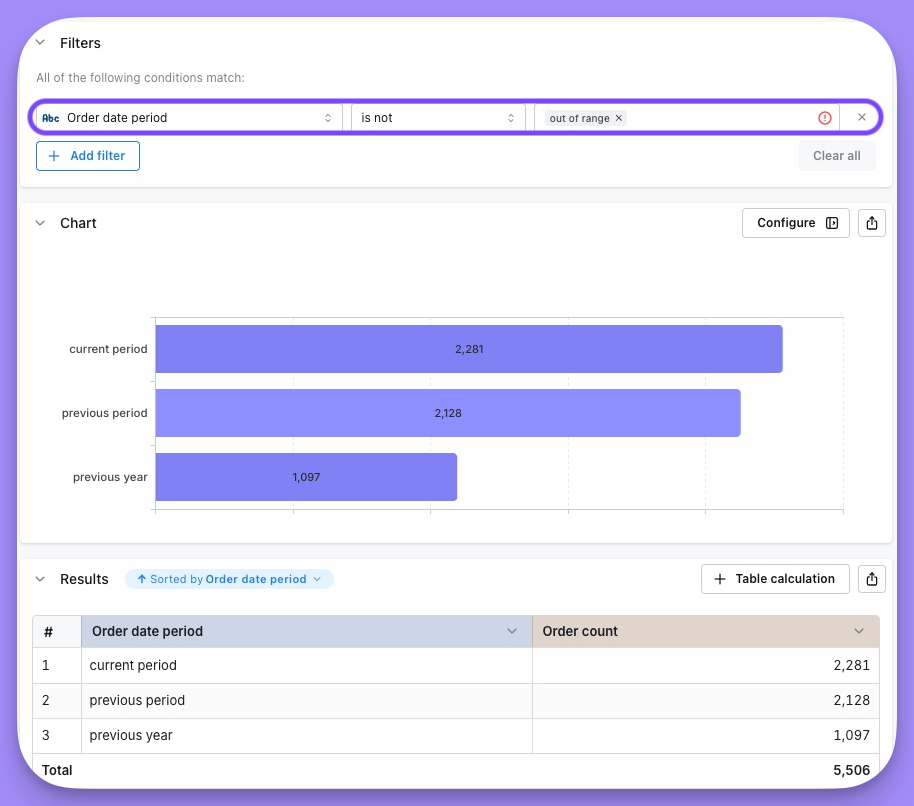
You can then add this chart to a dashboard. Users can select an option from the Date Range parameter and the charts will automatically update to display the selected period.
Custom date range example
Similar to above, you can also set up a custom date range parameter that allows users to select specific start and end dates for their analysis.
Below is the code needed for the parameter and the additional dimension to categorize the date periods for a custom date range:
Custom date range parameter configuration
models:
  - name: dbt_orders
    config:
      meta:
        parameters:
          custom_range_start:
            label: "Start of custom date range"
            description: "The start of the custom date range"
            type: date
          custom_range_end:
            label: "End of custom date range"
            description: "The end of the custom date range"
type: datemodels:
- name: dbt_orders
meta:
parameters:
custom_range_start:
label: "Start of custom date range"
description: "The start of the custom date range"
type: date
custom_range_end:
label: "End of custom date range"
description: "The end of the custom date range"
type: datetype: model
name: dbt_orders
parameters:
custom_range_start:
label: "Start of custom date range"
description: "The start of the custom date range"
type: date
custom_range_end:
label: "End of custom date range"
description: "The end of the custom date range"
type: date
Custom date range additional dimension code
columns:
  - name: order_date
    description: 'Date of order placement by user.'
    config:
      meta:
        dimension:
          type: date
        additional_dimensions:
          order_date_custom_period:
            description: Date period bucket based on custom Start date and End date parameters
            type: string
            sql: |
              case
                --invalid date range
                when ${qyra.parameters.dbt_orders.custom_range_start} is null
                  or ${qyra.parameters.dbt_orders.custom_range_end} is null
                  or ${qyra.parameters.dbt_orders.custom_range_start} > ${qyra.parameters.dbt_orders.custom_range_end}
                  then 'invalid date range'

                --current period
                when ${order_date_day} >= ${qyra.parameters.dbt_orders.custom_range_start}
                  and ${order_date_day} <= ${qyra.parameters.dbt_orders.custom_range_end}
                  then 'current period'

                --previous period
                when ${order_date_day} between date_sub(
                  ${qyra.parameters.dbt_orders.custom_range_start},
                  interval (date_diff(
                    ${qyra.parameters.dbt_orders.custom_range_end},
                    ${qyra.parameters.dbt_orders.custom_range_start},
                    day
                  ) + 1) day
                ) and date_sub(
                  ${qyra.parameters.dbt_orders.custom_range_end},
                  interval (date_diff(
                    ${qyra.parameters.dbt_orders.custom_range_end},
                    ${qyra.parameters.dbt_orders.custom_range_start},
                    day
                  ) + 1) day
                )
                  then 'previous period'

                --previous year
                when date(${order_date_day}) between date_sub(${qyra.parameters.dbt_orders.custom_range_start}, interval 1 year)
                  and date_sub(${qyra.parameters.dbt_orders.custom_range_end}, interval 1 year)
                  then 'previous year'

                else 'out of range'
              end
columns:
  - name: order_date
    description: 'Date of order placement by user.'
    meta:
      dimension:
        type: date
      additional_dimensions:
        order_date_custom_period:
          description: Date period bucket based on custom Start date and End date parameters
          type: string
          sql: |
            case
              --invalid date range
              when ${qyra.parameters.dbt_orders.custom_range_start} is null
                or ${qyra.parameters.dbt_orders.custom_range_end} is null
                or ${qyra.parameters.dbt_orders.custom_range_start} > ${qyra.parameters.dbt_orders.custom_range_end}
                then 'invalid date range'

              --current period
              when ${order_date_day} >= ${qyra.parameters.dbt_orders.custom_range_start}
                and ${order_date_day} <= ${qyra.parameters.dbt_orders.custom_range_end}
                then 'current period'

              --previous period
              when ${order_date_day} between date_sub(
                ${qyra.parameters.dbt_orders.custom_range_start},
                interval (date_diff(
                  ${qyra.parameters.dbt_orders.custom_range_end},
                  ${qyra.parameters.dbt_orders.custom_range_start},
                  day
                ) + 1) day
              ) and date_sub(
                ${qyra.parameters.dbt_orders.custom_range_end},
                interval (date_diff(
                  ${qyra.parameters.dbt_orders.custom_range_end},
                  ${qyra.parameters.dbt_orders.custom_range_start},
                  day
                ) + 1) day
              )
                then 'previous period'

              --previous year
              when date(${order_date_day}) between date_sub(${qyra.parameters.dbt_orders.custom_range_start}, interval 1 year)
                and date_sub(${qyra.parameters.dbt_orders.custom_range_end}, interval 1 year)
                then 'previous year'

              else 'out of range'
enddimensions:
- name: order_date
description: 'Date of order placement by user.'
type: date
additional_dimensions:
order_date_custom_period:
description: Date period bucket based on custom Start date and End date parameters
type: string
sql: |
case
--invalid date range
when ${qyra.parameters.dbt_orders.custom_range_start} is null
or ${qyra.parameters.dbt_orders.custom_range_end} is null
or ${qyra.parameters.dbt_orders.custom_range_start} > ${qyra.parameters.dbt_orders.custom_range_end}
then 'invalid date range'
--current period
when ${order_date_day} >= ${qyra.parameters.dbt_orders.custom_range_start}
and ${order_date_day} <= ${qyra.parameters.dbt_orders.custom_range_end}
then 'current period'
--previous period
when ${order_date_day} between date_sub(
${qyra.parameters.dbt_orders.custom_range_start},
interval (date_diff(
${qyra.parameters.dbt_orders.custom_range_end},
${qyra.parameters.dbt_orders.custom_range_start},
day
) + 1) day
) and date_sub(
${qyra.parameters.dbt_orders.custom_range_end},
interval (date_diff(
${qyra.parameters.dbt_orders.custom_range_end},
${qyra.parameters.dbt_orders.custom_range_start},
day
) + 1) day
)
then 'previous period'
--previous year
when date(${order_date_day}) between date_sub(${qyra.parameters.dbt_orders.custom_range_start}, interval 1 year)
and date_sub(${qyra.parameters.dbt_orders.custom_range_end}, interval 1 year)
then 'previous year'
else 'out of range'
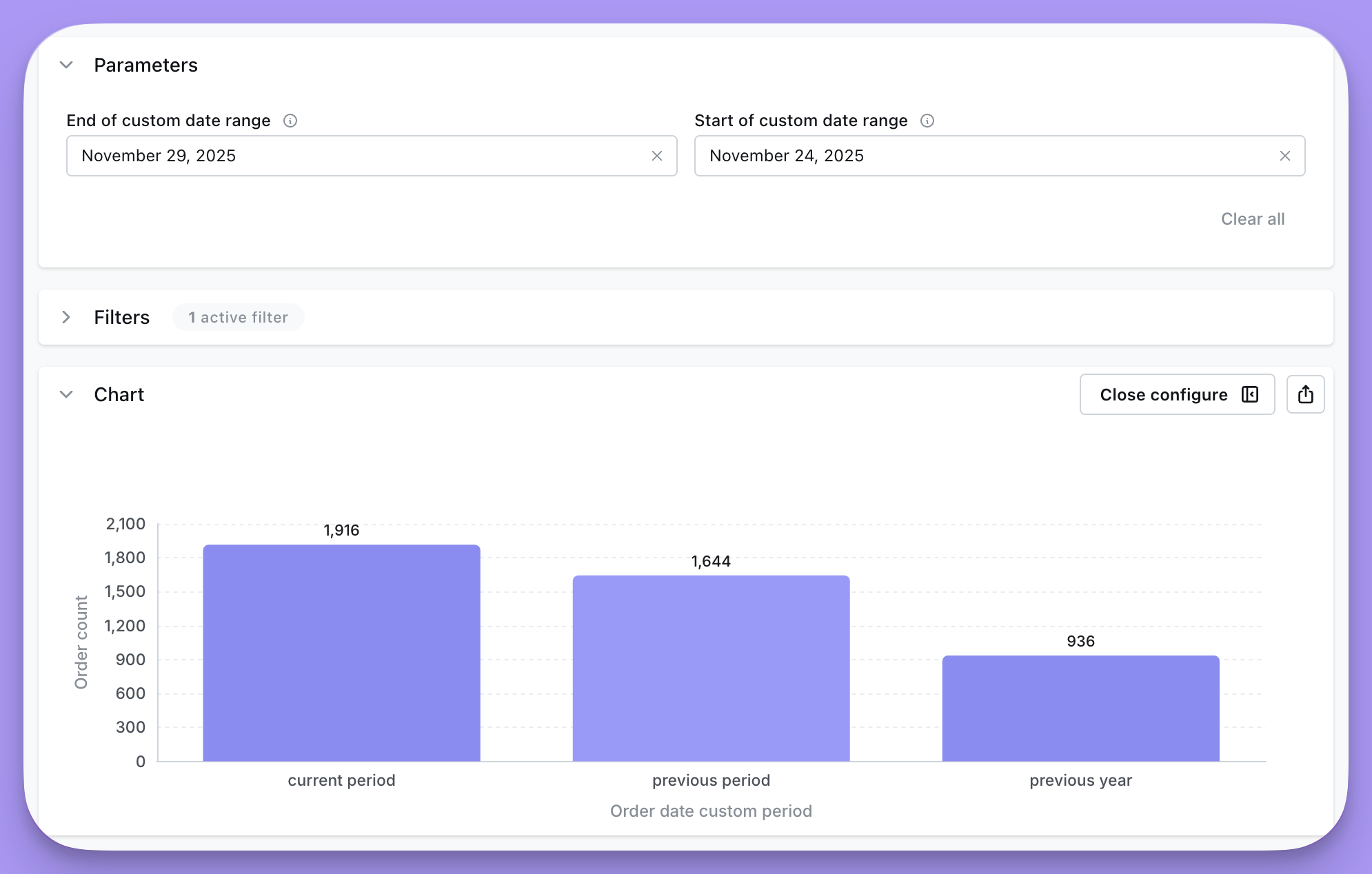
endThe code examples above will give you the following parameter options in the Qyra UI that will output the custom period labels shown in the chart: