Metrics reference
Every metric type, its configuration options, filters, formatting, and the SQL it compiles to
A metric is a value that describes or summarizes features from a collection of data points. For example: count of total number of user IDs, or sum of revenue.
In Qyra, metrics are used to summarize dimensions or, sometimes, other metrics.
Adding metrics to your project using the meta tag.
1. Using the column meta tag
To add a metric to Qyra using the meta tag, you define it in your dbt project under the dimension name you're trying to describe/summarize.
models:
  - name: orders_model
    columns:
      - name: user_id # dimension your metric is aggregating
        config:
          meta:
            metrics:
              distinct_user_ids: # name of your metric
                type: count_distinct # metric type
      - name: revenue # dimension your metric is aggregating
        config:
          meta:
            metrics:
              sum_revenue: # name of your metric
type: sum # metric typemodels:
- name: orders_model
columns:
- name: user_id # dimension your metric is aggregating
meta:
metrics:
distinct_user_ids: # name of your metric
type: count_distinct # metric type
- name: revenue # dimension your metric is aggregating
meta:
metrics:
sum_revenue: # name of your metric
type: sum # metric typetype: model
name: orders_model
dimensions:
- name: user_id # dimension your metric is aggregating
- name: revenue # dimension your metric is aggregating
metrics:
distinct_user_ids: # name of your metric
type: count_distinct # metric type
sql: ${TABLE}.user_id
sum_revenue: # name of your metric
type: sum # metric type
sql: ${TABLE}.revenueOnce you've got the hang of what these metrics look like, read more about the metric types you can use below.
Already defining metrics with dbt MetricFlow? Qyra can translate the supported subset of MetricFlow metrics into Qyra metrics on qyra deploy, so you don't have to duplicate the definitions in meta.metrics. See dbt MetricFlow metrics.
2. Using the model meta tag
Sometimes a metric references multiple columns, in these cases you can define the metric at the model level:
models:
  - name: orders_model
    config:
      meta:
        metrics:
          revenue_per_user:
            type: number
            sql: ${sum_revenue} / ${distinct_user_ids}
          sum_total_paid:
            type: sum
sql: ${revenue} + ${taxes_paid}models:
- name: orders_model
meta:
metrics:
revenue_per_user:
type: number
sql: ${sum_revenue} / ${distinct_user_ids}
sum_total_paid:
type: sum
sql: ${revenue} + ${taxes_paid}type: model
name: orders_model
metrics:
revenue_per_user:
type: number
sql: ${sum_revenue} / ${distinct_user_ids}
sum_total_paid:
type: sum
sql: ${revenue} + ${taxes_paid}Non-aggregate metrics (number, boolean, etc.) can only reference other metrics in sql: since they are inserted directly into the generated SQL query without being wrapped in an aggregate function.
Aggregate metrics (sum, count_distinct, etc.) can only reference dimensions since they are wrapped in an aggregate function before being added to the generated SQL query. Wrapping an aggregate function in another aggregate function will cause an error.
Post calculation metrics (percent_of_previous, percent_of_total, running_total) are computed after other metrics. They can reference aggregate and non-aggregate metrics only (they cannot reference dimensions or other post calculation metrics).
Read on to learn more about aggregate vs non-aggregate metrics!
Metric Categories
Each metric type falls into one of these categories. The metric categories tell you whether the metric type is an aggregation and what type of fields the metric can reference:
Aggregate metrics
Aggregate metric types perform (surprise, surprise) aggregations. Sums and averages are examples of aggregate metrics: they are measurements summarizing a collection of data points.
Aggregate metrics can only reference dimensions, not other metrics.
Aggregate metrics cannot use window functions in their sql. Their SQL is wrapped in an aggregate function and evaluated as part of the main GROUP BY in the generated query, and SQL does not allow window functions inside an aggregate call. See post calculation metrics for the window operations Qyra does support and what to do instead.
Non-aggregate metrics
Non-aggregate metrics are metric types that, you guessed it, do not perform aggregations.
Numbers and booleans are examples of non-aggregate metrics. These metric types perform a calculation on a single data point, so they can only reference aggregate metrics. They cannot reference dimensions.
Non-aggregate metrics cannot use window functions in their sql. Their SQL is inserted alongside the aggregate metrics in the same SELECT, which runs in the same step as the GROUP BY, so window functions — which must run after aggregation — are not allowed. See post calculation metrics for the window operations Qyra does support and what to do instead.
Post calculation metrics Experimental
Post calculation metrics are computed after aggregate and non-aggregate metrics in the query. Because they run after the main aggregations, Qyra wraps the aggregated results in an outer SELECT and evaluates the post calculation metric's SQL there, where window functions (OVER (...)) are valid.
Post calculation metrics only cover a fixed set of built-in window operations: percent_of_previous, percent_of_total, and running_total. They do not accept custom OVER (...) clauses. For anything else, model the logic directly in your dbt model (so the value is precomputed before Qyra queries it), or add a table calculation on the query results.
Post calculation metrics:
- Can only reference aggregate and non-aggregate metrics (they cannot reference dimensions or other post calculation metrics)
- Can be referenced in table calculations like any other metric
- Do not support the
filtersYML property
Post calculation metrics are Experimental.
Metric configuration
You can customize your metrics in your dbt model's YAML file. Here's an example of the properties used in defining a metric:
models:
  - name: sales_stats
    config:
      meta:
        joins:
          - join: web_sessions
            sql_on: ${web_sessions.date} = ${sales_stats.date}
        group_details:
          product_details:
            label: Product Details
            description: 'Fields that have information about the products in the basket.'
          item_details:
            label: Item Details
            description: 'Fields that have information about the items in the basket.'
    columns:
      - name: revenue
        description: 'Total estimated revenue in GBP based on forecasting done by the finance team.'
        config:
          meta:
            metrics:
              total_revenue:
                label: 'Total revenue GBP'
                type: SUM
                description: 'Total revenue in GBP'
                sql: 'IF(${revenue} IS NULL, 10, ${revenue})'
                groups: ['product_details', 'item_details'] # this would add the metric to a nested group: `product details` --> `item details`
                hidden: false
                format: '[$£]#,##0.00' # GBP rounded to two decimal points
                show_underlying_values:
                  - revenue
                  - forecast_date
                  - web_sessions.session_id # field from joined table
                filters:
- is_adjusted: truemodels:
- name: sales_stats
meta:
joins:
- join: web_sessions
sql_on: ${web_sessions.date} = ${sales_stats.date}
group_details:
product_details:
label: Product Details
description: 'Fields that have information about the products in the basket.'
item_details:
label: Item Details
description: 'Fields that have information about the items in the basket.'
columns:
- name: revenue
description: 'Total estimated revenue in GBP based on forecasting done by the finance team.'
meta:
metrics:
total_revenue:
label: 'Total revenue GBP'
type: SUM
description: 'Total revenue in GBP'
sql: 'IF(${revenue} IS NULL, 10, ${revenue})'
groups: ['product_details', 'item_details'] # this would add the metric to a nested group: `product details` --> `item details`
hidden: false
format: '[$£]#,##0.00' # GBP rounded to two decimal points
show_underlying_values:
- revenue
- forecast_date
- web_sessions.session_id # field from joined table
filters:
- is_adjusted: truetype: model
name: sales_stats
joins:
- join: web_sessions
sql_on: ${web_sessions.date} = ${sales_stats.date}
group_details:
product_details:
label: Product Details
description: 'Fields that have information about the products in the basket.'
item_details:
label: Item Details
description: 'Fields that have information about the items in the basket.'
dimensions:
- name: revenue
description: 'Total estimated revenue in GBP based on forecasting done by the finance team.'
metrics:
total_revenue:
label: 'Total revenue GBP'
type: SUM
description: 'Total revenue in GBP'
sql: 'IF(${revenue} IS NULL, 10, ${revenue})'
groups: ['product_details', 'item_details'] # this would add the metric to a nested group: `product details` --> `item details`
hidden: false
format: '[$£]#,##0.00' # GBP rounded to two decimal points
show_underlying_values:
- revenue
- forecast_date
- web_sessions.session_id # field from joined table
filters:
- is_adjusted: trueHere are all of the properties you can customize:
| Property | Required | Value | Description |
|---|---|---|---|
| label | No | string | Custom label. This is what you'll see in Qyra instead of the metric name. |
| type | Yes | metric type | Metrics must be one of the supported types. |
| description | No | string | Description of the metric that appears in Qyra. A default description is created by Qyra if this isn't included |
| sql | No | string | Custom SQL used to define the metric. |
| hidden | No | boolean | If set to true, the metric is hidden from Qyra. By default, this is set to false if you don't include this property. |
| compact | No | string | This option will compact the number value (e.g. 1,500 to 1.50K). Currently supports one of the following: ['auto', 'thousands', 'millions', 'billions', 'trillions', 'kilobytes', 'megabytes', 'gigabytes', 'terabytes', 'petabytes', 'kibibytes', 'mebibytes', 'gibibytes', 'tebibytes', 'pebibytes']. Use auto to dynamically pick K/M/B/T based on each value's magnitude. |
| format | No | string | This option will format the output value on the results table and CSV export. Supports spreadsheet-style formatting (e.g. #,##0.00). Use this website to help build your custom format. |
| separator | No | string | This option controls the grouping and decimal characters used when rendering numbers (e.g. 1.234.567,50 for European locales). One of: default, commaPeriod, spacePeriod, periodComma, noSeparatorPeriod, apostrophePeriod. |
| groups | No | string or string[] | If you set this property, the metric will be grouped in the sidebar with other metrics with the same group label. |
| urls | No | array | Adding urls to a metric allows your users to click metric values in the UI and take actions, like opening an external tool with a url, or open at a website. You can use liquid templates to customise the link based on the value of the dimension. |
| richText | No | string | Rich text template for displaying formatted content in table cells. Supports Markdown, HTML, and LiquidJS templating. |
| show_underlying_values | No | Array of dimension names | You can limit which dimensions or metrics are shown for a field when a user clicks View underlying data. The list must only include dimension/metric names from the base model or from any joined models. If not defined, we show all model dimensions. |
| filters | No | array | You can add filter logic to limit the values included in the metric calculation. You can add many filters. See which filter types are supported here. |
| tags | No | string[] | An array of string tags for categorizing and filtering metrics programmatically. Tags can be used by AI agents, API filters, and other backend workflows. See tags. |
Metric types
| Type | Category | Description |
|---|---|---|
| percentile | Aggregate | Generates a percentile of values within a column |
| median | Aggregate | Generates the 50th percentile of values within a column |
| average | Aggregate | Generates an average (mean) of values within a column |
| boolean | Non-aggregate | For fields that will show if something is true or false |
| count | Aggregate | Counts the total number of values in the dimension |
| count_distinct | Aggregate | Counts the total unique number of values in the dimension |
| date | Non-aggregate | For adding calculations to metrics that return dates. |
| max | Aggregate | Generates the maximum value within a numeric column |
| min | Aggregate | Generates the minimum value within a numeric column |
| number | Non-aggregate | For adding calculations to metrics that return numbers. |
| string | Non-aggregate | For metrics that contain letters or special characters |
| sum | Aggregate | Generates a sum of values within a column |
| sum_distinct | Aggregate (Beta) | Generates a sum of values, deduplicating by specified keys |
| average_distinct | Aggregate (Beta) | Generates an average of values, deduplicating by specified keys |
| percent_of_previous | Post calculation (Experimental) | Current value as a percentage of the previous row's value |
| percent_of_total | Post calculation (Experimental) | Current value as a percentage of the total across the result set (or partition) |
| running_total | Post calculation (Experimental) | Cumulative total |
percentile
Takes the percentile of the values in the given field. Like SQL's PERCENTILE_CONT function.
The percentile metric can be used on any numeric dimension or, for custom SQL, any valid SQL expression that gives a numeric table column.
For example, this creates a metric median_price by taking the 50% percentile of the item_price dimension:
columns:
  - name: item_price
    config:
      meta:
        metrics:
          median_price:
            type: percentile
percentile: 50columns:
- name: item_price
meta:
metrics:
median_price:
type: percentile
percentile: 50type: model
name: my_model
dimensions:
- name: item_price
metrics:
median_price:
type: percentile
percentile: 50
sql: ${TABLE}.item_pricemedian
Takes the 50th percentile of the values in the given field. Like SQL's PERCENTILE_CONT(0.5) function.
The median metric can be used on any numeric dimension or, for custom SQL, any valid SQL expression that gives a numeric table column.
For example, this creates a metric median_price by taking the 50% percentile of the item_price dimension:
columns:
  - name: item_price
    config:
      meta:
        metrics:
          median_price:
type: mediancolumns:
- name: item_price
meta:
metrics:
median_price:
type: mediantype: model
name: my_model
dimensions:
- name: item_price
metrics:
median_price:
type: median
sql: ${TABLE}.item_priceaverage
Takes the average (mean) of the values in the given field. Like SQL's AVG function.
The average metric can be used on any numeric dimension or, for custom SQL, any valid SQL expression that gives a numeric table column.
For example, this creates a metric avg_price by taking the average of the item_price dimension:
columns:
  - name: item_price
    config:
      meta:
        metrics:
          avg_price:
type: averagecolumns:
- name: item_price
meta:
metrics:
avg_price:
type: averagetype: model
name: my_model
dimensions:
- name: item_price
metrics:
avg_price:
type: average
sql: ${TABLE}.item_priceboolean
Tells you whether something is True or False.
The boolean metric can be used on any valid SQL expression that gives you a TRUE or FALSE value. It can only be used on aggregations, which means either aggregate metrics or custom SQL that references other metrics. You cannot build a boolean metric by referencing other unaggregated dimensions from your model.
boolean metrics don't do any aggregations; they just reference other aggregations.
For example, the avg_price metric below is an average of all of the item_price values in our product table. A second metric called is_avg_price_above_20 is a boolean type metric. The is_avg_price_above_20 metric has a custom SQL expression that tells us whether the avg_price value is greater than 20.
columns:
  - name: item_price
    config:
      meta:
        metrics:
          avg_price:
            type: average
          is_avg_price_above_20:
            type: boolean
sql: 'IF(${avg_price} > 20, TRUE, FALSE)'columns:
- name: item_price
meta:
metrics:
avg_price:
type: average
is_avg_price_above_20:
type: boolean
sql: 'IF(${avg_price} > 20, TRUE, FALSE)'type: model
name: my_model
dimensions:
- name: item_price
metrics:
avg_price:
type: average
sql: ${TABLE}.item_price
is_avg_price_above_20:
type: boolean
sql: 'IF(${avg_price} > 20, TRUE, FALSE)'count
Does a table count, like SQL’s COUNT function.
The count metric can be used on any dimension or, for custom SQL, any valid SQL expression that gives a set of values.
For example, this creates a metric number_of_users by counting the number of user_id values in the table:
columns:
  - name: user_id
    config:
      meta:
        metrics:
          number_of_users:
type: countcolumns:
- name: user_id
meta:
metrics:
number_of_users:
type: counttype: model
name: my_model
dimensions:
- name: user_id
metrics:
number_of_users:
type: count
sql: ${TABLE}.user_idcount_distinct
Counts the number of distinct values in a given field. It's like SQL’s COUNT DISTINCT function.
The count_distinct metric can be used on any dimension or, for custom SQL, any valid SQL expression that gives a set of values.
For example, this creates a metric number_of_unique_users by counting the number of unique user_id values in the table:
columns:
  - name: user_id
    config:
      meta:
        metrics:
          number_of_unique_users:
type: count_distinctcolumns:
- name: user_id
meta:
metrics:
number_of_unique_users:
type: count_distincttype: model
name: my_model
dimensions:
- name: user_id
metrics:
number_of_unique_users:
type: count_distinct
sql: ${TABLE}.user_iddate
Gives you a date value from an expression.
The date metric can be used on any valid SQL expression that gives you a date value. It can only be used on aggregations, which means either aggregate metrics or custom SQL that references other metrics. You cannot build a date metric by referencing other unaggregated dimensions from your model.
Creating a max or min date metric with type: date
If you want to create a metric of a maximum or minimum date, you can't use type: max or of type: min metrics because these are only compatible with numeric type fields. Instead, you can calculate a maximum or minimum date by defining a metric of type: date and using some custom sql, like this:
columns:
  - name: created_at_date
    config:
      meta:
        dimension:
          type: date
        metrics:
          max_created_at_date:
            type: date
sql: MAX(${TABLE}.created_at_date)columns:
- name: created_at_date
meta:
dimension:
type: date
metrics:
max_created_at_date:
type: date
sql: MAX(${TABLE}.created_at_date)type: model
name: my_model
dimensions:
- name: created_at_date
type: date
metrics:
max_created_at_date:
type: date
sql: MAX(${TABLE}.created_at_date)max
Max gives you the largest value in a given numeric field. It's like SQL’s MAX function.
The max metric can be used on any numeric dimension or, for custom SQL, any valid SQL expression that gives a numeric value.
Because type: max metrics only work with numerical fields, you can't use them to find a maximum date. Instead, you can use the MAX() function in the sql parameter of a metric of type: date to get a maximum date (you can see an example of this in the date section.
For example, this creates a metric max_delivery_cost by looking at the delivery_cost dimension and taking the largest value it finds:
columns:
  - name: delivery_cost
    config:
      meta:
        metrics:
          max_delivery_cost:
type: maxcolumns:
- name: delivery_cost
meta:
metrics:
max_delivery_cost:
type: maxtype: model
name: my_model
dimensions:
- name: delivery_cost
metrics:
max_delivery_cost:
type: max
sql: ${TABLE}.delivery_costmin
Min gives you the smallest value in a given numeric field. It's like SQL’s MIN function.
The min metric can be used on any numeric dimension or, for custom SQL, any valid SQL expression that gives a numeric value.
Because type: min metrics only work with numerical fields, you can't use them to find a minimum date. Instead, you can use the MIN() function in the sql parameter of a metric of type: date to get a minimum date (you can see an example of this in the date section.
For example, this creates a metric min_delivery_cost by looking at the delivery_cost dimension and taking the smallest value it finds:
columns:
  - name: delivery_cost
    config:
      meta:
        metrics:
          min_delivery_cost:
type: mincolumns:
- name: delivery_cost
meta:
metrics:
min_delivery_cost:
type: mintype: model
name: my_model
dimensions:
- name: delivery_cost
metrics:
min_delivery_cost:
type: min
sql: ${TABLE}.delivery_costnumber
Used with numbers or integers. A number metric doesn't perform any aggregation but can be used to perform simple transformations on other metrics.
The number metric can be used on any valid SQL expression that gives you a numeric or integer value. It can only be used on aggregations, which means either aggregate metrics or custom SQL that references other metrics. You cannot build a number metric by referencing other unaggregated dimensions from your model.
For example, this creates a metric called total_gross_profit_margin_percentage based on the total_sale_price and total_gross_profit_margin aggregate metrics:
columns:
  - name: sale_price
    config:
      meta:
        metrics:
          total_sale_price:
            type: sum
  - name: gross_profit_margin
    config:
      meta:
        metrics:
          total_gross_profit_margin:
            type: sum
          total_gross_profit_margin_percentage:
            type: number
sql: '(${total_gross_profit_margin}/ NULLIF(${total_sale_price},0))'columns:
- name: sale_price
meta:
metrics:
total_sale_price:
type: sum
- name: gross_profit_margin
meta:
metrics:
total_gross_profit_margin:
type: sum
total_gross_profit_margin_percentage:
type: number
sql: '(${total_gross_profit_margin}/ NULLIF(${total_sale_price},0))'type: model
name: my_model
dimensions:
- name: sale_price
- name: gross_profit_margin
metrics:
total_sale_price:
type: sum
sql: ${TABLE}.sale_price
total_gross_profit_margin:
type: sum
sql: ${TABLE}.gross_profit_margin
total_gross_profit_margin_percentage:
type: number
sql: '(${total_gross_profit_margin}/ NULLIF(${total_sale_price},0))'The example above also uses the NULLIF() SQL function to avoid division-by-zero errors.
sum
Adds up the values in a given field. Like SQL's SUM function.
The sum metric can be used on any numeric dimension or, for custom SQL, any valid SQL expression that gives a numeric table column.
For example, this creates a metric total_revenue by adding up the values in the revenue dimension:
columns:
  - name: revenue
    config:
      meta:
        metrics:
          total_revenue:
type: sumcolumns:
- name: revenue
meta:
metrics:
total_revenue:
type: sumtype: model
name: my_model
dimensions:
- name: revenue
metrics:
total_revenue:
type: sum
sql: ${TABLE}.revenuesum_distinct Beta
sum_distinct is in Beta.
Adds up the values in a given field while deduplicating data based on one or more specified distinct keys. This is useful when you have wide tables where values are repeated across rows and you need to sum unique values only.
Qyra already supports SQL fanout protection to remove duplicates when joining tables together. sum_distinct allows you to remove duplicates from wide tables where deduplication cannot be handled at the join level.
The sum_distinct metric requires:
sql: The field to sumdistinct_keys: An array of one or more fields to deduplicate by
The metric orders by the value being summed and takes the first occurrence for each unique combination of distinct keys. If there are different values for the same distinct key combination, the first one encountered will be used.
Example: Summing order shipping costs
Consider a model containing order_id, order_item_id, and order_shipping_cost:
| order_id | order_item_id | order_shipping_cost |
|---|---|---|
| 1 🟦 | 1 | 10 |
| 1 🟦 | 2 | 10 |
| 2 🟩 | 3 | 20 |
| 2 🟩 | 4 | 20 |
| 2 🟩 | 5 | 20 |
| 2 🟩 | 6 | 30 |
To sum shipping costs for all orders, you need to deduplicate by order_id:
- When
order_idis the distinct key, the firstorder_shipping_costin ascending order is taken for each order - Order 1 🟦 contributes 10
- Order 2 🟩 contributes 20 (the first value when ordered ascending)
- The
order_shipping_costof 30 for order 2 is ignored - Total: 30
If the value you are aggregating is truly distinct based on the distinct key (e.g., each order has only one shipping cost), this won't be a problem. However, if there are multiple different values for the same distinct key, only the first value in ascending order will be used.
models:
- name: order_line_items
config:
meta:
metrics:
total_shipping_cost:
type: sum_distinct
sql: ${order_shipping_cost}
distinct_keys: [order_id]
description: >
Total shipping cost correctly deduped. Each order's shipping cost is
summed once, regardless of how many line items the order has.
format: usd
round: 2models:
- name: order_line_items
meta:
metrics:
total_shipping_cost:
type: sum_distinct
sql: ${order_shipping_cost}
distinct_keys: [order_id]
description: >
Total shipping cost correctly deduped. Each order's shipping cost is
summed once, regardless of how many line items the order has.
format: usd
round: 2type: model
name: order_line_items
metrics:
total_shipping_cost:
type: sum_distinct
sql: ${TABLE}.order_shipping_cost
distinct_keys: [order_id]
description: >
Total shipping cost correctly deduped. Each order's shipping cost is
summed once, regardless of how many line items the order has.
format: usd
round: 2Using multiple distinct keys
When you need to deduplicate by a combination of fields, you can specify multiple distinct keys. A row is considered unique only when the entire combination of key values is unique.
For example, warehouse processing fees are charged per warehouse per order. If there are two items from the same warehouse in the same order, the fee should not be counted twice:
| order_id | order_item_id | item_warehouse_location | warehouse_processing_fee_per_order |
|---|---|---|---|
| 🟦 1 | 1 | US | 2.5 |
| 🟦 1 | 2 | US | 2.5 |
| 🟩 2 | 3 | US | 2.5 |
| 🟩 2 | 4 | Canada | 3.0 |
| 🟩 2 | 5 | Canada | 3.0 |
| 🟩 2 | 6 | UK | 4.0 |
With distinct_keys: [order_id, item_warehouse_location]:
- Order 1 🟦: One unique warehouse (US) → 2.5
- Order 2 🟩: Three unique warehouses (US, Canada, UK) → 2.5 + 3.0 + 4.0 = 9.5
- Total: 12.0
columns:
- name: warehouse_processing_fee_per_order
description: warehouse processing fee per order
config:
meta:
dimension:
type: number
metrics:
total_processing_fee:
type: sum_distinct
distinct_keys: [order_id, item_warehouse_location]
description: >
Processing fees are charged per warehouse per order.
If there are two items from the same warehouse the fee
should not be counted twice.columns:
- name: warehouse_processing_fee_per_order
description: warehouse processing fee per order
meta:
dimension:
type: number
metrics:
total_processing_fee:
type: sum_distinct
distinct_keys: [order_id, item_warehouse_location]
description: >
Processing fees are charged per warehouse per order.
If there are two items from the same warehouse the fee
should not be counted twice.type: model
name: order_line_items
metrics:
total_processing_fee:
type: sum_distinct
sql: ${TABLE}.warehouse_processing_fee_per_order
distinct_keys: [order_id, item_warehouse_location]
description: >
Processing fees are charged per warehouse per order.
If there are two items from the same warehouse the fee
should not be counted twice.How selected dimensions interact with distinct_keys
Deduplication is always performed globally on the distinct_keys you defined on the metric, regardless of which dimensions you select in a query.
- If a selected dimension is also a
distinct_key, the metric is grouped by that dimension and you get one deduplicated value per group. - If a selected dimension is not one of the
distinct_keys, it does not affect deduplication. The globally deduplicated value is repeated across every row that shares the samedistinct_keysvalue.
For example, with distinct_keys: [order_id]:
- Selecting
order_idreturns one deduplicated shipping cost per order. - Selecting an unrelated dimension such as
item_warehouse_locationreturns the same global deduplicated total alongside each item_warehouse_location row, becauseitem_warehouse_locationis independent of theorder_idgrain.
If you want a per-group total that varies with an unrelated dimension, add that dimension to distinct_keys so it becomes part of the dedup grain.
average_distinct Beta
average_distinct is in Beta.
Calculates the average of values in a given field while deduplicating data based on one or more specified distinct keys. This works the same way as sum_distinct, but computes an average instead of a sum.
Qyra already supports SQL fanout protection to remove duplicates when joining tables together. average_distinct allows you to remove duplicates from wide tables where deduplication cannot be handled at the join level.
The average_distinct metric requires:
sql: The field to averagedistinct_keys: An array of one or more fields to deduplicate by
The metric orders by the value being averaged and takes the first occurrence for each unique combination of distinct keys. If there are different values for the same distinct key combination, the first one encountered will be used.
Example: Averaging order shipping costs
Consider a model containing order_id, order_item_id, and order_shipping_cost:
| order_id | order_item_id | order_shipping_cost |
|---|---|---|
| 1 🟦 | 1 | 10 |
| 1 🟦 | 2 | 10 |
| 2 🟩 | 3 | 20 |
| 2 🟩 | 4 | 20 |
| 2 🟩 | 5 | 20 |
| 2 🟩 | 6 | 30 |
To calculate the average shipping cost per order, you need to deduplicate by order_id:
- When
order_idis the distinct key, the firstorder_shipping_costin ascending order is taken for each order - Order 1 🟦 contributes 10
- Order 2 🟩 contributes 20 (the first value when ordered ascending)
- The
order_shipping_costof 30 for order 2 is ignored - Average: (10 + 20) / 2 = 15
Without average_distinct, a naive AVG on this table would give (10 + 10 + 20 + 20 + 20 + 30) / 6 = 18.33, which is incorrect because duplicate rows inflate the result.
If the value you are aggregating is truly distinct based on the distinct key (e.g., each order has only one shipping cost), this won't be a problem. However, if there are multiple different values for the same distinct key, only the first value in ascending order will be used.
models:
- name: order_line_items
config:
meta:
metrics:
avg_shipping_cost:
type: average_distinct
sql: ${order_shipping_cost}
distinct_keys: [order_id]
description: >
Average shipping cost per order, correctly deduped. Each order's
shipping cost is counted once, regardless of how many line items
the order has.
format: usd
round: 2models:
- name: order_line_items
meta:
metrics:
avg_shipping_cost:
type: average_distinct
sql: ${order_shipping_cost}
distinct_keys: [order_id]
description: >
Average shipping cost per order, correctly deduped. Each order's
shipping cost is counted once, regardless of how many line items
the order has.
format: usd
round: 2type: model
name: order_line_items
metrics:
avg_shipping_cost:
type: average_distinct
sql: ${TABLE}.order_shipping_cost
distinct_keys: [order_id]
description: >
Average shipping cost per order, correctly deduped. Each order's
shipping cost is counted once, regardless of how many line items
the order has.
format: usd
round: 2Using multiple distinct keys
When you need to deduplicate by a combination of fields, you can specify multiple distinct keys. A row is considered unique only when the entire combination of key values is unique.
For example, warehouse processing fees are charged per warehouse per order. To find the average processing fee per warehouse-order combination:
| order_id | order_item_id | item_warehouse_location | warehouse_processing_fee_per_order |
|---|---|---|---|
| 🟦 1 | 1 | US | 2.5 |
| 🟦 1 | 2 | US | 2.5 |
| 🟩 2 | 3 | US | 2.5 |
| 🟩 2 | 4 | Canada | 3.0 |
| 🟩 2 | 5 | Canada | 3.0 |
| 🟩 2 | 6 | UK | 4.0 |
With distinct_keys: [order_id, item_warehouse_location]:
- Order 1 🟦, US → 2.5
- Order 2 🟩, US → 2.5
- Order 2 🟩, Canada → 3.0
- Order 2 🟩, UK → 4.0
- Average: (2.5 + 2.5 + 3.0 + 4.0) / 4 = 3.0
columns:
- name: warehouse_processing_fee_per_order
description: warehouse processing fee per order
config:
meta:
dimension:
type: number
metrics:
avg_processing_fee:
type: average_distinct
distinct_keys: [order_id, item_warehouse_location]
description: >
Average processing fee per warehouse-order combination.
Deduplicates so each warehouse-order pair is counted once.columns:
- name: warehouse_processing_fee_per_order
description: warehouse processing fee per order
meta:
dimension:
type: number
metrics:
avg_processing_fee:
type: average_distinct
distinct_keys: [order_id, item_warehouse_location]
description: >
Average processing fee per warehouse-order combination.
Deduplicates so each warehouse-order pair is counted once.type: model
name: order_line_items
metrics:
avg_processing_fee:
type: average_distinct
sql: ${TABLE}.warehouse_processing_fee_per_order
distinct_keys: [order_id, item_warehouse_location]
description: >
Average processing fee per warehouse-order combination.
Deduplicates so each warehouse-order pair is counted once.average_distinct follows the same rules as sum_distinct for how selected dimensions interact with distinct_keys. See How selected dimensions interact with distinct_keys for details.
string
Used with fields that include letters or special characters.
The string metric can be used on any valid SQL expression that gives you a string value. It can only be used on aggregations, which means either aggregate metrics or custom SQL that references other metrics. You cannot build a string metric by referencing other unaggregated dimensions from your model.
string metrics are rarely used because most SQL aggregate functions don't return strings. One common exception is MySQL’s GROUP_CONCAT function.
For example, this creates a metric product_name_group by combining the unique values of a dimension called product_name:
columns:
- name: product_name
config:
meta:
metrics:
product_name_group:
type: string
sql: 'GROUP_CONCAT(${TABLE}.product_name)'columns:
- name: product_name
meta:
metrics:
product_name_group:
type: string
sql: 'GROUP_CONCAT(${TABLE}.product_name)'type: model
name: my_model
dimensions:
- name: product_name
metrics:
product_name_group:
type: string
sql: 'GROUP_CONCAT(${TABLE}.product_name)'percent_of_previous
Returns the current value as a percentage of the previous row's value for a referenced metric.
For example, to calculate the percent of the previous value of total revenue:
models:
- name: orders_model
config:
meta:
metrics:
total_revenue:
type: sum
revenue_percent_of_previous:
type: percent_of_previous
sql: ${total_revenue}
format: '0.00%'models:
- name: orders_model
meta:
metrics:
total_revenue:
type: sum
revenue_percent_of_previous:
type: percent_of_previous
sql: ${total_revenue}
format: '0.00%'type: model
name: orders_model
metrics:
total_revenue:
type: sum
sql: ${TABLE}.revenue
revenue_percent_of_previous:
type: percent_of_previous
sql: ${total_revenue}
format: '0.00%'Note: If the previous value is 0 or NULL, the result will be NULL to avoid division-by-zero.
This is a post calculation metric which is computed after other metrics. It can only reference aggregate and non-aggregate metrics (and cannot reference dimensions or other post calculation metrics).
percent_of_total
Returns the current value as a percentage of the total across the result set (or partition) for a referenced metric.
For example, to calculate each row's percent of total revenue:
models:
- name: orders_model
config:
meta:
metrics:
total_revenue:
type: sum
revenue_percent_of_total:
type: percent_of_total
sql: ${total_revenue}
format: '0.00%'models:
- name: orders_model
meta:
metrics:
total_revenue:
type: sum
revenue_percent_of_total:
type: percent_of_total
sql: ${total_revenue}
format: '0.00%'type: model
name: orders_model
metrics:
total_revenue:
type: sum
sql: ${TABLE}.revenue
revenue_percent_of_total:
type: percent_of_total
sql: ${total_revenue}
format: '0.00%'This is a post calculation metric which is computed after other metrics. It can only reference aggregate and non-aggregate metrics (and cannot reference dimensions or other post calculation metrics).
running_total
Returns the cumulative total of a referenced metric according to the query's grouping and sort order.
For example, to calculate a running total of revenue:
models:
- name: orders_model
config:
meta:
metrics:
total_revenue:
type: sum
running_total_revenue:
type: running_total
sql: ${total_revenue}models:
- name: orders_model
meta:
metrics:
total_revenue:
type: sum
running_total_revenue:
type: running_total
sql: ${total_revenue}type: model
name: orders_model
metrics:
total_revenue:
type: sum
sql: ${TABLE}.revenue
running_total_revenue:
type: running_total
sql: ${total_revenue}This is a post calculation metric which is computed after other metrics. It can only reference aggregate and non-aggregate metrics (and cannot reference dimensions or other post calculation metrics).
Description
We add default descriptions to all of the metrics you include in your model. But, you can override these using the description parameter when you define your metric.
metrics:
num_user_ids:
type: count
description: 'Total number of user IDs. NOTE: this is NOT counting unique user IDs'Format
You can use the format parameter to have your fields show in a particular format in Qyra. Qyra supports spreadsheet-style format expressions for all field types.
To help you build your format expression, we recommend using https://customformats.com/.
models:
- name: sales
columns:
- name: revenue
meta:
metrics:
total_us_revenue:
type: sum
description: 'Total revenue in USD, with two decimal places, compacted to thousands'
format: '$#,##0.00," K"' # 505,430 will appear as '$505.43 K'
percent_of_total_global_revenue:
type: number
description: 'Percent of total global revenue coming from US revenue.'
sql: ${total_us_revenue} / ${total_global_revenue}
format: '0.00%' # 0.67895243 will appear as '67.89%'Example format expressions
| Description | Format Expression | Raw Value | Formatted Output |
|---|---|---|---|
| Adds "km" suffix to the value | #,##0.00" km" | 100000.00 | 100,000.00 km |
| 15000.25 | 15,000.25 km | ||
| 500 | 500.00 km | ||
| Format date with 12-hour clock | m/d/yyyy h:mm AM/PM | 2023-09-05T15:45:00Z | 9/5/2023 3:45 PM |
| 2024-01-20T08:30:00Z | 1/20/2024 8:30 AM | ||
| Display the full name of the day | dddd | 2023-09-05T15:45:00Z | Tuesday |
| 2024-01-20T08:30:00Z | Saturday | ||
| Format positive, negative, and zero values | "⬆️ "0;"⬇️ "0;0 | -500 | ⬇️ 500 |
| 200 | ⬆️ 200 | ||
| 0 | 0 | ||
| Text formatting | "Delivered in "@ | 2 weeks | Delivered in 2 weeks |
| 18 hours | Delivered in 18 hours | ||
| Percentage formatting | #,##0.00% | 0.6758 | 67.58% |
| 0.1 | 10.00% | ||
| 0.002 | 0.20% | ||
| No formatting | 0 | 12345232 | 12345232 |
| 56.7856 | 57 | ||
| Currency formatting (USD) | [$$]#,##0.00 | 15430.75436 | $15,430.75 |
| 1234.50 | $1,234.50 | ||
| Currency formatting (GBP) | [$£]#,##0.00 | 15430.75436 | £15,430.75 |
| 1234.50 | £1,234.50 | ||
| Compact currency in thousands | [$$]#,##0,"K" | 15430.75436 | $15K |
| 15430.75436 | $15.43K | ||
| Compact currency in millions | [$$]#,##0.00,,"M" | 13334567 | $13.33M |
| 120000000 | $120.00M |
Compact
You can compact values in your YAML. For example, if I wanted all of my revenue values to be shown in thousands (e.g. 1,500 appears as 1.50K), then I would write something like this in my .yml:
models:
- name: sales
columns:
- name: revenue
meta:
dimension:
compact: thousands # You can also use 'K'| Value | Alias | Equivalent format expression | Example output |
|---|---|---|---|
| auto | dynamic — picks K/M/B/T per value | 1.50K / 2.30M | |
| thousands | "K" and "thousand" | '#,##0," K"' or '#,##0.00," K"' | 1K |
| millions | "M" and "million" | '#,##0,," M"' or '#,##0.00,," M"' | 1M |
| billions | "B" and "billion" | '#,##0,,," B"' or '#,##0.00,,," B"' | 1B |
| trillions | "T" and "trillion" | '#,##0,,,," T"' or '#,##0.00,,,," T"' | 1T |
| kilobytes | "KB" and "kilobyte" | 1KB | |
| megabytes | "MB" and "megabyte" | 1MB | |
| gigabytes | "GB" and "gigabyte" | 1GB | |
| terabytes | "TB" and "terabyte" | 1TB | |
| petabytes | "PB" and "petabyte" | 1PB | |
| kibibytes | "KiB" and "kibibyte" | 1KiB | |
| mebibytes | "MiB" and "mebibyte" | 1MiB | |
| gibibytes | "GiB" and "gibibyte" | 1GiB | |
| tebibytes | "TiB" and "tebibyte" | 1TiB | |
| pebibytes | "PiB" and "pebibyte" | 1PiB |
Separator
You can use the separator property to control the grouping and decimal characters used when rendering numbers, so values display correctly for non-US locales (e.g. 1.234.567,50 in Europe or 1'234'567.50 in Switzerland).
separator only changes the separator characters. It composes with format (including spreadsheet-style format expressions), compact, round, and currency, which still control the overall shape of the number.
models:
- name: sales
columns:
  - name: revenue
    meta:
      metrics:
        total_revenue:
          type: sum
format: '[$€]#,##0.00'
separator: periodComma # 1.234.567,50 €These are the supported values:
| Value | Example output | Description |
|---|---|---|
default | 1,234,567.50 | Uses the Qyra default (comma thousands, period decimal). Same as omitting separator. |
commaPeriod | 1,234,567.50 | Comma thousands separator, period decimal separator. |
spacePeriod | 1 234 567.50 | Space thousands separator, period decimal separator. |
periodComma | 1.234.567,50 | Period thousands separator, comma decimal separator. |
noSeparatorPeriod | 1234567.50 | No thousands separator, period decimal separator. |
apostrophePeriod | 1'234'567.50 | Apostrophe thousands separator, period decimal separator (Swiss). |
Custom SQL in aggregate metrics
You can include custom SQL in your metric definition to build more advanced metrics using the sql parameter. Inside the sql parameter, you can reference any other dimension from the given model and any joined models. You can’t reference other metrics.
You can reference dimensions from the same model like this: sql: "${dimension_in_this_model}"
Or from joined models like this: sql: "${other_model.dimension_in_other_model}"
metrics:
  num_unique_7d_web_active_user_ids:
    type: count_distinct # metric type
    sql: 'IF(${is_7d_web_active}, ${user_id}, NULL)'
  num_unique_paid_user_ids:
    type: count_distinct
    sql: 'IF(${subscriptions.is_active}, ${user_id}, NULL)'
Referencing time intervals in custom SQL
You can reference specific time intervals of dimensions in custom SQL for aggregate metrics. When a dimension has time intervals defined, you can reference the specific interval by appending the interval name to the dimension name.
      max_month:
        type: max
        sql: ${session_start_month}
In this example, the metric references ${session_start_month}, which is the MONTH time interval of the session_start dimension. This allows you to perform aggregations on specific time interval versions of your dimensions.
Using custom SQL in non-aggregate metrics
In non-aggregate metrics, you can reference any other metric from the given model and any joined models. You can’t reference other dimensions.
You can reference metrics from the same model like this: sql: "${metric_in_this_model}"Or from joined models like this: sql: "${other_model.metric_in_other_model}"
metrics:
  num_unique_users:
    type: count_distinct
  is_num_unique_users_above_100:
    type: boolean
    sql: 'IF(${num_unique_users} > 100, TRUE, FALSE)'
  percentage_user_growth_daily:
    type: number
sql: '(${num_unique_users} - ${growth_model.num_unique_users_lag_1d}) / NULLIF(${growth_model.num_unique_users_lag_1d}, 0)'Show underlying values
By default, we show all of the dimensions from the Table when you click View underlying data. If you have fields from a joined table included in your results table, then we'll also show you all of the fields from the joined Table.
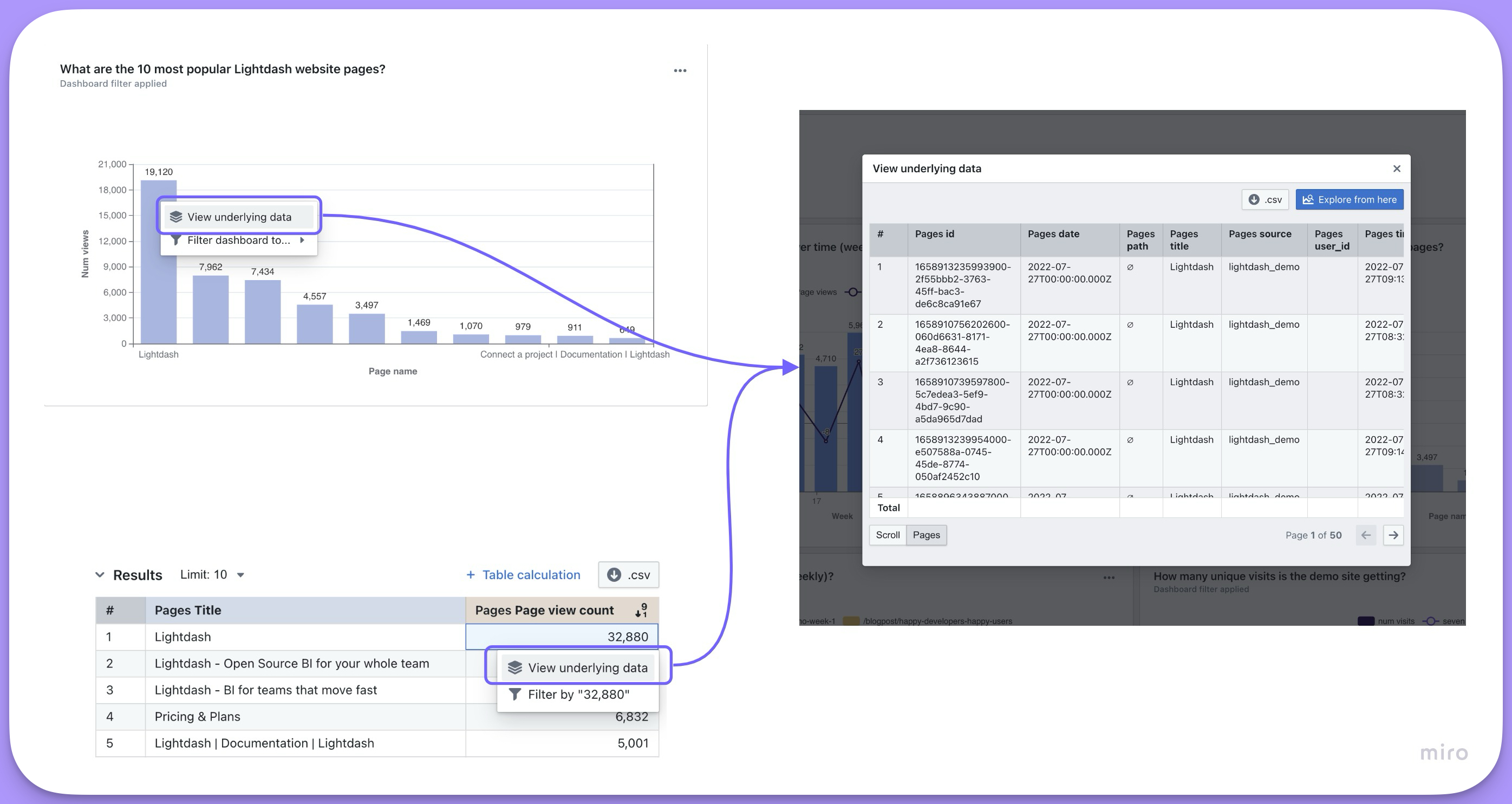
You can limit which dimensions are shown, as well as add metrics to be included, for a field when a user clicks View underlying data by adding the list of dimensions and/or metrics to your .yml files.
When show_underlying_values is not explicitly defined for a metric, View underlying data is capped at the first 50 dimensions from the Table (including joined tables). To show more than 50 dimensions, or to control exactly which fields appear, specify the fields explicitly in show_underlying_values (or default_show_underlying_values at the model level) in your .yml.
Hidden dimensions (with hidden: true) cannot be included in drilldowns. If you need a dimension to appear in drilldowns but not in the Explore sidebar, use groups to organize dimensions instead.
models:
  - name: sales_stats
    meta:
      joins:
        - join: web_sessions
          sql_on: ${web_sessions.date} = ${sales_stats.date}
    columns:
      - name: user_id
        description: 'Unique ID for users.'
        meta:
          dimension:
            type: string
          metrics:
            count_users:
              type: count_distinct
              show_underlying_values:
                - revenue_gbp_total_est
                - actual_date
- web_sessions.session_id # field from joined tableDefault show underlying values
You can set a default show_underlying_values configuration at the model level using default_show_underlying_values. This applies to all metrics in that model, and individual metrics can override it by specifying their own show_underlying_values.
See default_show_underlying_values in the Tables reference for full details and examples.
The list of fields must be made of dimension names (or metrics if you'd like to include them) from the base table or from any joined tables. To reference a field from a joined table, you just need to prefix the field name with the joined table name, like this: my_joined_table_name.my_dimension.
The order that the fields are listed in show_underlying_values is the order that they'll appear in on the view underlying data table.
Referencing time intervals in show underlying values
You can reference specific time intervals of dimensions in the show_underlying_values list. When a dimension has time intervals defined, you can reference the specific interval by appending the interval name to the dimension name (e.g., session_start_month, session_end_quarter).
      count:
        type: count
        show_underlying_values:
          - session_start_month
          - session_end_quarter
In this example, session_start_month and session_end_quarter reference the MONTH and QUARTER time intervals of the session_start and session_end dimensions respectively.
Groups
You can group your dimensions and metrics in the sidebar using the groups parameter.
To do this, you need to set up group_details in the model's configuration. Then, you can use these groups to organize metrics and dimensions. You can create nested groups up to 2 levels.
models:
  - name: baskets
    config:
      meta:
        group_details:
          product_details:
            label: Product Details
            description: 'Fields that have information about the products in the basket.'
          item_details:
            label: Item Details
            description: 'Fields that have information about the items in the basket.'

    columns:
      - name: basket_item_id
        description: 'ID for the product item within the basket.'
        config:
          meta:
            dimension:
              groups: ['product_details', 'item_details'] # this would add the dimension to a nested group: `product details` --> `item details`
            metrics:
              count_total_basket_items:
                type: count_distinct
                groups: ['product_details', 'item_details'] # this would add the metric to a nested group: `product details` --> `item details`
      - name: product_name
        description: 'Full name of the product.'
        config:
          meta:
            dimension:
              label: 'Product name'
              groups: ['product_details'] # this would add the dimension under the group label: `product_details`
            metrics:
              count_total_product_types:
                type: count_distinct
groups: ['product_details'] # this would add the metric under the group label: `product_details`models:
- name: baskets
meta:
group_details:
product_details:
label: Product Details
description: 'Fields that have information about the products in the basket.'
item_details:
label: Item Details
description: 'Fields that have information about the items in the basket.'
columns:
- name: basket_item_id
description: 'ID for the product item within the basket.'
meta:
dimension:
groups: ['product_details', 'item_details'] # this would add the dimension to a nested group: `product details` --> `item details`
metrics:
count_total_basket_items:
type: count_distinct
groups: ['product_details', 'item_details'] # this would add the metric to a nested group: `product details` --> `item details`
- name: product_name
description: 'Full name of the product.'
meta:
dimension:
label: 'Product name'
groups: ['product_details'] # this would add the dimension under the group label: `product_details`
metrics:
count_total_product_types:
type: count_distinct
groups: ['product_details'] # this would add the metric under the group label: `product_details`type: model
name: baskets
group_details:
product_details:
label: Product Details
description: 'Fields that have information about the products in the basket.'
item_details:
label: Item Details
description: 'Fields that have information about the items in the basket.'
dimensions:
- name: basket_item_id
description: 'ID for the product item within the basket.'
groups: ['product_details', 'item_details'] # this would add the dimension to a nested group: `product details` --> `item details`
- name: product_name
description: 'Full name of the product.'
label: 'Product name'
groups: ['product_details'] # this would add the dimension under the group label: `product_details`
metrics:
count_total_basket_items:
type: count_distinct
sql: ${TABLE}.basket_item_id
groups: ['product_details', 'item_details'] # this would add the metric to a nested group: `product details` --> `item details`
count_total_product_types:
type: count_distinct
sql: ${TABLE}.product_name
groups: ['product_details'] # this would add the metric under the group label: `product_details`Rich text
The richText property allows you to define custom HTML/Markdown templates for displaying metric values in table cells. This enables sophisticated data presentation with formatting, styling, conditional logic, and external integrations.
Rich text only affects UI display in table cells. It has no impact on value formatting, CSV exports, or the underlying data values.
Conditional formatting example
Use Liquid control flow tags for conditional display based on metric values:
columns:
  - name: customer_lifetime_value
    config:
      meta:
        metrics:
          average_clv:
            type: average
            richText: |
              {% raw %}{% if value.raw >= 100 %}
              ### 📈 ${ value.formatted }
              **Excellent** Average CLV
              {% elsif value.raw >= 50 %}
              ### 📊 ${ value.formatted }
              **Good** Average CLV
              {% else %}
              ### ⚠️ ${ value.formatted }
              **Low** Average CLV
{% endif %}{% endraw %}columns:
- name: customer_lifetime_value
meta:
metrics:
average_clv:
type: average
richText: |
{% raw %}{% if value.raw >= 100 %}
### 📈 ${ value.formatted }
**Excellent** Average CLV
{% elsif value.raw >= 50 %}
### 📊 ${ value.formatted }
**Good** Average CLV
{% else %}
### ⚠️ ${ value.formatted }
**Low** Average CLV
{% endif %}{% endraw %}metrics:
average_clv:
type: average
sql: ${TABLE}.customer_lifetime_value
richText: |
{% raw %}{% if value.raw >= 100 %}
### 📈 ${ value.formatted }
**Excellent** Average CLV
{% elsif value.raw >= 50 %}
### 📊 ${ value.formatted }
**Good** Average CLV
{% else %}
### ⚠️ ${ value.formatted }
**Low** Average CLV
{% endif %}{% endraw %}Liquid templating in rich text
Use templates to configure values dynamically at runtime based on query results.
Available liquid tags
| Tag | Description |
|---|---|
${ value.formatted } | The exact value of the dimension as seen in the Qyra UI. For example $1,427.20 |
${ value.raw } | The raw value of the dimension returned from the underlying SQL query. For example 1427.2 |
${ row.table_name.column_name.formatted } | The exact value of the column as seen in the Qyra UI. For example $1,427.20 |
${ row.table_name.column_name.raw } | The raw value of the dimension returned from the underlying SQL query. For example 1427.2 |
Available liquid filters
Filters can be used to make small transformations of your values:
-
url_encode: Encode a string as URL safe, for example it replaces spaces with%20.${ value.formatted | url_encode } -
downcase: Convert a string to lowercase.${ value.formatted | downcase } -
append: Append one string to another.${ value.formatted | append: ".html" }
There are many more filters available in the Liquid documentation.
Filters
Filters are applied to metrics any time that metric is used in Qyra. Filters can only be used with aggregate metric types.
For example, we could add a filter to our users count to make sure it didn't include user IDs with closed accounts, like this:
models:
  - name: sales_stats
    columns:
      - name: user_id
        description: 'Unique ID for users.'
        config:
          meta:
            dimension:
              type: string
            metrics:
              count_users:
                type: count_distinct
                filters:
- is_closed_account: falsemodels:
- name: sales_stats
columns:
- name: user_id
description: 'Unique ID for users.'
meta:
dimension:
type: string
metrics:
count_users:
type: count_distinct
filters:
- is_closed_account: falsetype: model
name: sales_stats
dimensions:
- name: user_id
description: 'Unique ID for users.'
type: string
metrics:
count_users:
type: count_distinct
sql: ${TABLE}.user_id
filters:
- is_closed_account: falseThese filters do not appear in the Filters tab in the Explore view, instead, they are applied automatically in the SQL query that fetches your results. That means filters added using the filter parameter can't be removed in the UI and won't be visible to users unless they look at the SQL query.
Available filter types
| Type | Example (in English) | Example (as code) |
|---|---|---|
| is | User name is equal to katie | user_name: "katie" |
| is not | User name is not equal to katie | user_name: "!katie" |
| contains | User name contains katie | user_name: "%katie%" |
| does not contain | User name does not contain katie | user_name: "!%katie%" |
| starts with | User name starts with katie | user_name: "katie%" |
| ends with | User name ends with katie | user_name: "%katie" |
| is greater than (number) | Number of orders is greater than 4 | num_orders: "> 4" |
| in the past (date) (interval) | Date is before x (days / months / years) | date: "inThePast 14 months" |
| in the next (date) (interval) | Date is after x (days / months / years) | date: "inTheNext 14 days" |
| in the current (date) (unit) | Date is in the current (day / week / month / quarter / year) | date: "inTheCurrent month" |
| not in the current (date) (unit) | Date is not in the current (day / week / month / quarter / year) | date: "notInTheCurrent year" |
| is greater than or equal to | Number of orders is greater than or equal to 4 | num_orders: ">= 4" |
| is less than | Number of orders is less than 4 | num_orders: "< 4" |
| is less than or equal to | Number of orders is less than or equal to 4 | num_orders: "<= 4" |
| is null | Status is NULL | status: "null" |
| is not null | Status is not NULL | status: "!null" |
| is [boolean] | Is complete is true | is_complete: "true" |
| is not [boolean] | Is complete is false or null | is_complete: "!true" |
Date filters
For date filtering, use inThePast or inTheNext followed by a number and time unit (days, months, or years). These keywords are case sensitive and must be written exactly as shown.
filters:
  - created_at: 'inThePast 30 days'
To filter dynamically to the current time period, use inTheCurrent or notInTheCurrent followed by a unit of time (day, week, month, quarter, or year) — no number needed.
filters:
  - created_at: 'inTheCurrent month'
Special characters in filters
To use special characters such as %!_> in your filter value you can either put the value in quotes, or escape special characters with a backslash \. For example, if you wanted to filter for subscription status of is_subscribed you can write the metric in one of these ways:
filters:
- subscription_status: 'is_subscribed'filters:
- subscription_status: is\_subscribedFiltering using a list of values
To filter a field using a list of values you can supply them as an array for that field. This generates a SQL IN clause, e.g. WHERE order_status IN ('completed', 'shipped').
For example, if you wanted to filter for orders with order status completed or shipped you should write the metric like:
columns:
  - name: order_id
    config:
      meta:
        metrics:
          completed_or_shipped_order_count:
            type: count_distinct
            filters:
              - order_status:
                  - completed
- shippedcolumns:
- name: order_id
meta:
metrics:
completed_or_shipped_order_count:
type: count_distinct
filters:
- order_status:
- completed
- shippedtype: model
name: my_model
dimensions:
- name: order_id
metrics:
completed_or_shipped_order_count:
type: count_distinct
sql: ${TABLE}.order_id
filters:
- order_status:
- completed
- shippedFilters are joined using AND
For example:
filters:
  - is_closed_account: false
  - is_7d_active: true
Would give you logic like is_closed_account = TRUE AND is_7d_active = FALSE.
Adding filters from joined models
To filter using a field from a joined model, just use the syntax model_name.field, like this:
models:
  - name: sales_stats
    config:
      meta:
        joins:
          - join: web_sessions
            sql_on: ${web_sessions.date} = ${sales_stats.date}
    columns:
      - name: user_id
        description: 'Unique ID for users.'
        config:
          meta:
            dimension:
              type: string
            metrics:
              count_users:
                type: count_distinct
                filters:
                  - is_closed_account: false
- web_sessions.is_bot_user: falsemodels:
- name: sales_stats
meta:
joins:
- join: web_sessions
sql_on: ${web_sessions.date} = ${sales_stats.date}
columns:
- name: user_id
description: 'Unique ID for users.'
meta:
dimension:
type: string
metrics:
count_users:
type: count_distinct
filters:
- is_closed_account: false
- web_sessions.is_bot_user: falsetype: model
name: sales_stats
joins:
- join: web_sessions
sql_on: ${web_sessions.date} = ${sales_stats.date}
dimensions:
- name: user_id
description: 'Unique ID for users.'
type: string
metrics:
count_users:
type: count_distinct
sql: ${TABLE}.user_id
filters:
- is_closed_account: false
- web_sessions.is_bot_user: falseReferencing time intervals in filters
You can reference specific time intervals of dimensions in metric filters. When a dimension has time intervals defined, you can filter on the specific interval by appending the interval name to the dimension name (e.g., session_start_day).
      count:
        type: count
        filters:
          - session_start_day: "!null"
In this example, the filter checks that session_start_day (the DAY time interval of the session_start dimension) is not null.
Metric filters cannot be used with non-aggregate metrics
You can't use filters with non-aggregate metric types. Instead, if your non-aggregate metrics are referencing aggregate metric types, you need to apply metric filters to the aggregate metrics.
Here's an example: imagine you wanted to calculate the average cost per item that had the status shipped. You would need to do something like this in your .yml:
models:
  - name: orders
    config:
      meta:
        metrics:
          average_cost_per_item_shipped:
            type: number
            sql: ${total_cost_of_shipped} / ${count_unique_items_shipped}
    columns:
      - name: item_id
        description: 'Unique ID for items ordered.'
        config:
          meta:
            dimension:
              type: string
            metrics:
              count_unique_items:
                type: count_distinct
              count_unique_items_shipped:
                type: count_distinct
                filters:
                  - status: 'shipped'
      - name: item_cost
        description: 'Cost for each item ordered.'
        config:
          meta:
            dimension:
              type: number
            metrics:
              total_cost:
                type: sum
              total_cost_of_shipped:
                type: sum
                filters:
- status: 'shipped'models:
- name: orders
meta:
metrics:
average_cost_per_item_shipped:
type: number
sql: ${total_cost_of_shipped} / ${count_unique_items_shipped}
columns:
- name: item_id
description: 'Unique ID for items ordered.'
meta:
dimension:
type: string
metrics:
count_unique_items:
type: count_distinct
count_unique_items_shipped:
type: count_distinct
filters:
- status: 'shipped'
- name: item_cost
description: 'Cost for each item ordered.'
meta:
dimension:
type: number
metrics:
total_cost:
type: sum
total_cost_of_shipped:
type: sum
filters:
- status: 'shipped'type: model
name: orders
dimensions:
- name: item_id
description: 'Unique ID for items ordered.'
type: string
- name: item_cost
description: 'Cost for each item ordered.'
type: number
metrics:
count_unique_items:
type: count_distinct
sql: ${TABLE}.item_id
count_unique_items_shipped:
type: count_distinct
sql: ${TABLE}.item_id
filters:
- status: 'shipped'
total_cost:
type: sum
sql: ${TABLE}.item_cost
total_cost_of_shipped:
type: sum
sql: ${TABLE}.item_cost
filters:
- status: 'shipped'
average_cost_per_item_shipped:
type: number
sql: ${total_cost_of_shipped} / ${count_unique_items_shipped}Tags
You can add tags to individual metrics to categorize them for programmatic use. Tags are string arrays that Qyra preserves and exposes via the API.
Tags are useful for:
- AI agent access control — restrict which metrics an AI agent can see
- API filtering — filter the data catalog metrics endpoint by tag to retrieve only the metrics you need
- Pipeline ingestion — flag specific metrics for downstream ETL or semantic layer workflows
Tags are not displayed as Spotlight categories in the Qyra UI. They function as a backend/programmatic control mechanism only.
models:
  - name: orders
    columns:
      - name: amount
        config:
          meta:
            metrics:
              total_order_amount:
                type: sum
                tags: ["core", "finance"]
              average_order_amount:
                type: average
tags: ["core"]models:
- name: orders
columns:
- name: amount
meta:
metrics:
total_order_amount:
type: sum
tags: ["core", "finance"]
average_order_amount:
type: average
tags: ["core"]type: model
name: orders
metrics:
total_order_amount:
type: sum
sql: ${TABLE}.amount
tags: ["core", "finance"]
average_order_amount:
type: average
sql: ${TABLE}.amount
tags: ["core"]Level of detail metrics
When you build a query in Qyra, every metric in the results is grouped by the dimensions you've selected. This is usually what you want, but sometimes you need a metric to be calculated at a different granularity than the rest of the query. For example, you might want a denominator that stays at a coarser grain even when you add more dimensions to the view.
This is commonly known as a "level of detail" (LOD) calculation. The idea is that certain metrics should ignore specific dimensions during aggregation, so their values remain stable regardless of how the data is sliced.
Coming to the demo site soon.
The problem
This comes up most often with percentage or ratio metrics. Consider this scenario: you want to calculate "what % of accounts in each segment have Won deals?" and you want to break this down by deal plan.
The numerator (accounts with Won deals) should naturally vary by plan. But the denominator (total accounts in the segment) should not. There are 152 Enterprise accounts regardless of which plan you're analyzing.
When you join accounts to deals and group by both segment and plan, the denominator gets scoped to only the accounts that have deals in that plan. This is the default behavior in any BI tool that uses a join-then-group approach.
Without level of detail (denominator grouped by plan):
| Segment | Plan | Accounts with Won Deals | Total Accounts | % |
|---|---|---|---|---|
| Enterprise | Basic | 36 | 107 | 33.6% |
| Enterprise | Professional | 13 | 46 | 28.3% |
The total accounts column shows 107 and 46 because only accounts that have deals in that specific plan are included in the count.
With level of detail (denominator independent of plan):
| Segment | Plan | Accounts with Won Deals | Total Accounts | % |
|---|---|---|---|---|
| Enterprise | Basic | 36 | 152 | 23.7% |
| Enterprise | Professional | 13 | 152 | 8.6% |
The total accounts column stays at 152 because the denominator is computed independently of the plan dimension. This is achieved by pre-computing the denominator in a separate CTE in your dbt model.
The workaround
The solution is to pre-compute the coarser-grain metric (total accounts per segment) in your dbt model, so it is always correct regardless of which dimensions are selected in Qyra.
Step 1: Pre-compute the denominator in your dbt model
Step 2: Define the metrics in your YAML
models:
  - name: account_deal_metrics
    config:
      meta:
        metrics:
          pct_accounts_with_won_deals:
            type: number
            label: "% Accounts with Won Deals"
            format: percent
            sql: ${unique_accounts_with_won_deals} / NULLIF(${segment_total_accounts}, 0)
    columns:
      - name: account_id
        config:
          meta:
            dimension:
              type: string
              hidden: true
            metrics:
              unique_accounts_with_won_deals:
                type: count_distinct
                filters:
                  - stage: 'Won'
      - name: segment
        config:
          meta:
            dimension:
              type: string
      - name: plan
        config:
          meta:
            dimension:
              type: string
      - name: total_accounts_in_segment
        config:
          meta:
            dimension:
              type: number
            metrics:
              segment_total_accounts:
type: maxmodels:
- name: account_deal_metrics
meta:
metrics:
pct_accounts_with_won_deals:
type: number
label: "% Accounts with Won Deals"
format: percent
sql: ${unique_accounts_with_won_deals} / NULLIF(${segment_total_accounts}, 0)
columns:
- name: account_id
meta:
dimension:
type: string
hidden: true
metrics:
unique_accounts_with_won_deals:
type: count_distinct
filters:
- stage: 'Won'
- name: segment
meta:
dimension:
type: string
- name: plan
meta:
dimension:
type: string
- name: total_accounts_in_segment
meta:
dimension:
type: number
metrics:
segment_total_accounts:
type: maxtype: model
name: account_deal_metrics
dimensions:
- name: account_id
type: string
hidden: true
- name: segment
type: string
- name: plan
type: string
- name: total_accounts_in_segment
type: number
metrics:
unique_accounts_with_won_deals:
type: count_distinct
sql: ${TABLE}.account_id
filters:
- stage: 'Won'
segment_total_accounts:
type: max
sql: ${TABLE}.total_accounts_in_segment
pct_accounts_with_won_deals:
type: number
label: "% Accounts with Won Deals"
format: percent
sql: ${unique_accounts_with_won_deals} / NULLIF(${segment_total_accounts}, 0)The key insight is that total_accounts_in_segment is pre-computed in the SQL and is the same value for every row in a segment. Using max as the aggregation returns the correct segment-level total, regardless of what other dimensions (like plan) are in the query.
The pct_accounts_with_won_deals metric then divides the numerator (which correctly varies by plan) by the denominator (which stays fixed per segment).