Aggregate functions
Built-in functions for referencing column and row totals in your table calculations
Aggregate functions let you reference grand totals and row totals in your table calculations. Unlike row functions and pivot functions which compile to SQL window functions, aggregate functions generate separate CTEs that compute totals from the underlying data.
This means total() correctly handles all metric types — including count_distinct and average — by re-running the metric's native aggregation rather than naively summing grouped values.
Aggregate functions only accept metric field references — dimensions and other table calculations are not valid arguments. Passing a dimension (e.g. total(${orders.customer_id})) returns the error "Tried to reference metric with unknown field id".
total
Returns the grand total of a metric across all rows, computed from the raw data using the metric's native aggregation.
total(${table.metric})| Parameter | Type | Description |
|---|---|---|
metric | metric reference | The metric to compute the grand total for |
Example
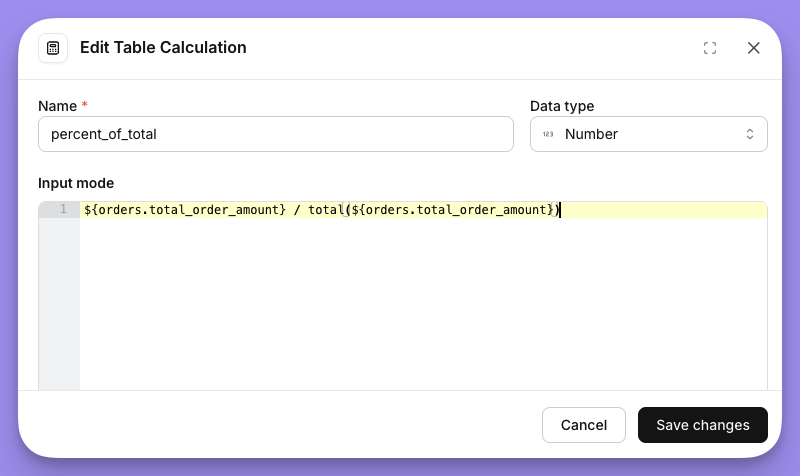
Calculate each row's share of total revenue:
${orders.total_revenue} / total(${orders.total_revenue})With percent formatting applied, this gives you each row as a percentage of the overall total.
row_total
Returns the sum of a metric's values across all pivot columns for the current row.
row_total(${table.metric})| Parameter | Type | Description |
|---|---|---|
metric | metric reference | The metric to sum across pivot columns |
row_total is only available when your query includes a pivoted dimension. If no pivot is configured, row_total(${table.metric}) falls back to the metric's value directly.
Example
In a pivot table with revenue broken out by region, calculate each region's share of the row total:
${orders.total_revenue} / row_total(${orders.total_revenue})