SCIM Integration
Automate user and group provisioning from your identity provider with SCIM 2.0
SCIM Integration is only available on Qyra Enterprise plans.
For more information on our plans, visit our pricing page.
Summary
SCIM (System for Cross-domain Identity Management) is an open standard protocol for automating user provisioning. Qyra supports any identity provider (IdP) that implements the SCIM 2.0 standard, including Azure, Okta, OneLogin, and others.
This document describes the steps required to integrate SCIM into your Enterprise instance, allowing your IdP to manage users and groups within your organization.
If you are self-hosting Qyra, see SCIM self-hosting for the environment variables to set, including the required AUTH_ENABLE_OIDC_TO_EMAIL_LINKING companion when combining SCIM with SSO.
When using SCIM with SSO, AUTH_ENABLE_OIDC_TO_EMAIL_LINKING=true is required. Without it, Qyra tries to create a new user on SSO sign-in and fails because the email is already taken by the SCIM-provisioned user.
SCIM Setup within Qyra
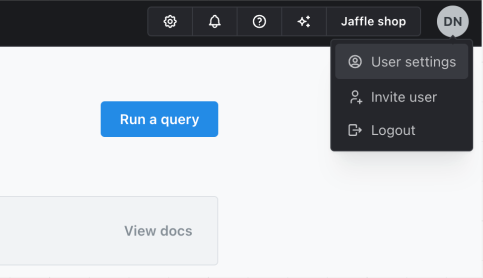
- Sign into your Qyra instance, click your initials at the top-right, and select User Settings.
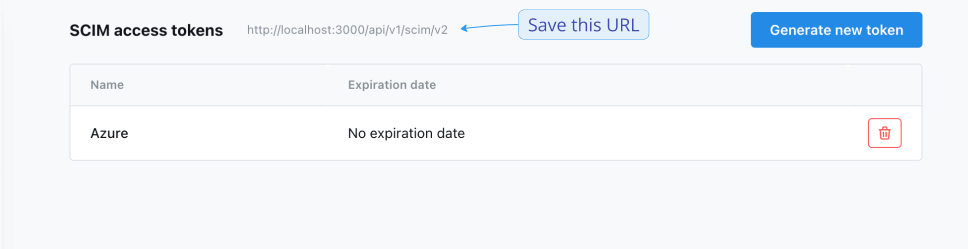
- In the sidebar, select SCIM Access Tokens.
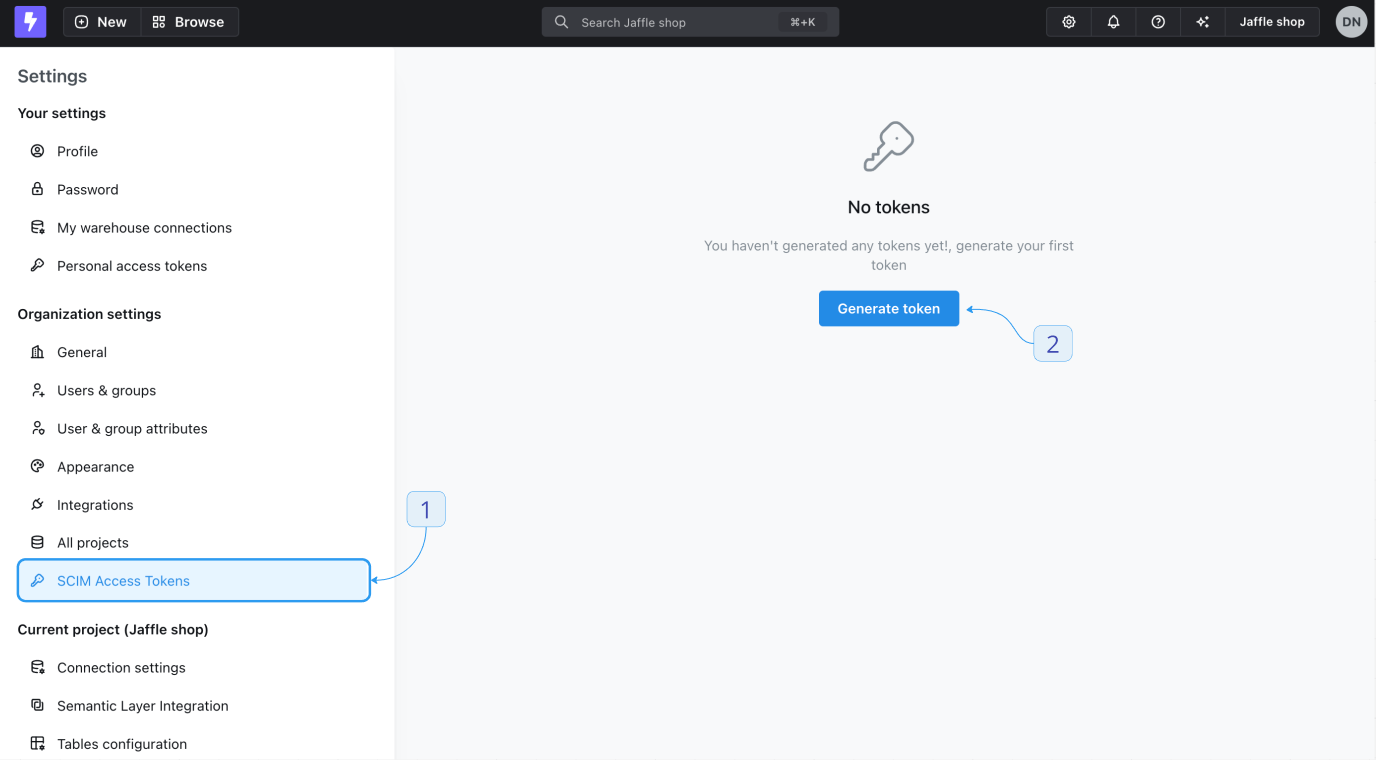
- Click Generate new token.
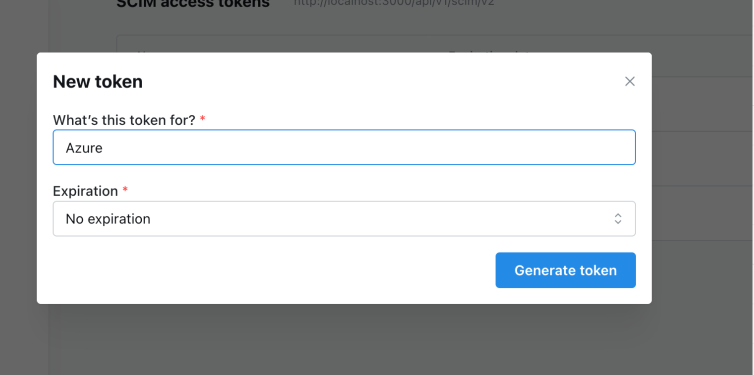
- Give it a name and an optional expiration date.
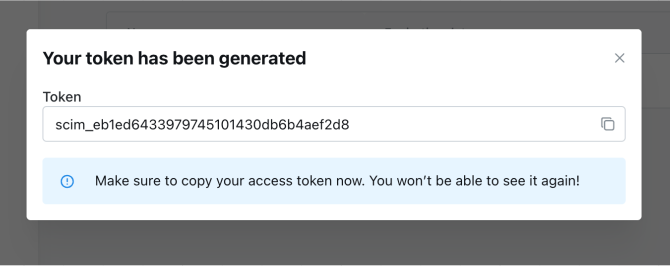
- Once generated, copy and save it in a safe place, as it cannot be viewed again once the modal is closed.
- Note: Now you will also be able to see your SCIM URL at the top of the page. You will need this when connecting an external SCIM service, such as Okta or Azure.
Integration guides
API docs
You can find the full API docs and examples for SCIM here.
SCIM behavior and implementation details
userNameis mapped to the user's primary email in Qyra. Make sure your identity provider setsuserNameto the user's primary email (and, if sending anemailsarray, the primary email should match).- When a user is updated to be inactive (
active: false) via SCIM, Qyra will mark the user as inactive, lower their organization role tomember, and remove their access from all projects and groups. If you later reactivate the user, you'll need to re-assign their group and project access via SCIM or in Qyra. - An organization must always have at least one
admin. Any SCIM request that would leave the organization with no admins (for example, demoting or deactivating the sole remaining admin) will be rejected with an error. - A user can only have one role per organization and per project, unless custom roles are enabled for the organization (which includes role sets) — see Provisioning role sets below.
- A user must have an organization role.
- On creation, if no
rolesare provided, the organization role will default tomember. - On edit (PUT/PATCH), if no
rolesare provided, no changes are made to the user's roles. - A user's project role will be removed if there is no entry for it in the SCIM request, or if there is a value
<project_uuid>:no-role. This allows for explicit role removal from projects. - To reduce data pollution, roles for preview projects cannot be managed via SCIM, as those projects are intended to be short‑lived.
Can the IdP-provided SCIM email be trusted?
In most cases, the email attribute sent via SCIM is trustworthy. However, confirm this with your IdP as some allow users to change their email address. If reliability isn’t guaranteed, use a stable, non-user-editable identifier instead (e.g., OIDC sub, SAML NameID, or Microsoft Entra ID UPN).
See provider‑specific guidance below.
Microsoft / Azure AD / Entra ID
The email field is not trusted. Users with Microsoft have a UPN (userPrincipalName) which is their immutable sign-in identifier. However, the email field is just a contact email that users can freely change themselves.
References:
- https://www.crowdstrike.com/en-us/blog/noauth-microsoft-azure-ad-vulnerability/
- https://learn.microsoft.com/en-us/entra/identity-platform/migrate-off-email-claim-authorization
- https://www.bleepingcomputer.com/news/security/microsoft-fixes-azure-ad-auth-flaw-enabling-account-takeover/
Using UPN as email claim in OIDC
- Navigate to App Registrations: In the left-hand navigation pane, select "Azure Active Directory," then "App registrations."
- Select Your Application: Find and select the application you want to update.
- Open the Manifest: In the application settings, select "Manifest" to open the JSON editor for the application manifest.
- Edit the Manifest: Make the necessary changes to the manifest. For example, to map the UPN to the email claim, you can add the following to the optionalClaims section:
{
  "optionalClaims": {
    "idToken": [
      {
        "name": "email",
        "source": "userPrincipalName",
        "essential": true
      }
    ]
  }
}User Role Provisioning
Qyra supports provisioning user roles through SCIM, allowing identity providers to specify and manage user roles (admin, member, etc.) when provisioning users. This makes it easier to manage user permissions directly from your identity provider without requiring additional steps in Qyra.
We support the standard SCIM 2.0 roles attribute as defined in RFC 7643. Use this to provision a user's organization and project roles.
Role types
Qyra defines two role scopes: Organization and Project. Both scopes support system roles and custom roles.
| Scope | System role value | Custom role value |
|---|---|---|
| Organization | The role name, such as member, viewer, interactive_viewer, editor, developer, or admin | The bare custom-role UUID: <custom_role_uuid> |
| Project | <project_uuid>:<role>, where role is viewer, interactive_viewer, editor, developer, or admin | <project_uuid>:<custom_role_uuid> |
Do not prefix an organization-level custom role with the organization UUID. Its value is only the custom-role UUID. Project role values always combine the project UUID and role identifier.
Examples:
[
    {
        schemas: [ScimSchemaType.ROLE],
        id: 'member',
        value: 'member',
        display: 'Member',
        type: 'Organization',
        supported: true,
    },
    {
        schemas: [ScimSchemaType.ROLE],
        id: 'b02daf62-03e8-4fe9-bf7f-16d59a93d5d1',
        value: 'b02daf62-03e8-4fe9-bf7f-16d59a93d5d1',
        display: 'Data consumer',
        type: 'Organization',
        supported: true,
    },
    {
        schemas: [ScimSchemaType.ROLE],
        id: '3675b69e-8324-4110-bdca-059031aa8da3:viewer',
        value: '3675b69e-8324-4110-bdca-059031aa8da3:viewer',
        display: 'Jaffle shop - Viewer',
        type: 'Project - Jaffle shop',
        supported: true,
    },
    {
        schemas: [ScimSchemaType.ROLE],
        id: '3675b69e-8324-4110-bdca-059031aa8da3:da116e0f-2b96-4af4-93b7-b2636a26853d',
        value:
            '3675b69e-8324-4110-bdca-059031aa8da3:da116e0f-2b96-4af4-93b7-b2636a26853d',
        display: 'Jaffle shop - my custom role',
        type: 'Project - Jaffle shop',
        supported: true,
    },
]Provisioning role sets
When custom roles are enabled for the organization, the same roles array can carry a complete role set per level: at most one system role plus any number of custom roles for the organization, and likewise per project. No Qyra-specific schema extension is needed.
Reading. GET /Users and GET /Users/{id} list every role the user holds. The organization's system role (or its only custom role) is marked "primary": true; every additional role is "primary": false.
"roles": [
  { "value": "viewer", "display": "Viewer", "type": "Organization", "primary": true },
  { "value": "6aa57126-fc60-42c3-9d83-495c40ae4ec3", "display": "Roadmap viewer", "type": "Organization", "primary": false },
  { "value": "3675b69e-8324-4110-bdca-059031aa8da3:editor", "display": "Jaffle shop - Editor", "type": "Project - Jaffle shop", "primary": false },
  { "value": "3675b69e-8324-4110-bdca-059031aa8da3:11df7b19-1db7-44f3-aa48-54f8bbd6c89a", "display": "Jaffle shop - SQL runner", "type": "Project - Jaffle shop", "primary": false }
]
Writing. SCIM owns the complete direct role set of the users it manages:
PUTandPATCHreplaceonrolesset the exact set: roles that are omitted are removed, and — as before — a project with no entry in the payload loses the user's direct access (<project_uuid>:no-rolestill works for explicit removal).PATCHaddunions the named roles into the existing set;PATCHremovetakes the named roles out.- Identical entries are de-duplicated. A payload with no organization entry, more than one system organization role, or more than one system role for the same project is rejected with
400. - Deactivating a user (
active: false) still clears their roles as described above.
Without custom roles, a roles array with more than one entry per level is rejected exactly as before, so existing IdP mappings do not change behaviour.
A payload with a single role per level (the legacy shape) replaces the whole set with that one role. If your IdP is the source of truth, make sure every role a user should keep is present in its roles mapping before enabling custom roles.
Configuring available roles in your Identity Provider (IdP)
The SCIM roles model is currently an IETF draft, so native support to auto-discover roles via a /Roles endpoint varies by provider and connector.
Qyra's /Roles endpoint returns system and custom roles. Organization-level custom roles use their bare custom-role UUID as id and value, with type set to Organization. Project-level custom roles use <project_uuid>:<custom_role_uuid>, with type set to Project - <project_name>.
- Okta: Does not natively auto-populate role picklists by consuming a SCIM
/Rolesendpoint. You can still provisionrolesmanually or implement custom sync using Okta Workflows or a custom app. - Microsoft Entra ID (Azure AD): Does not currently auto-discover roles from
/Roles. Use manual configuration of allowed roles. - Google Cloud Identity / Workspace: Custom SCIM applications are not supported, so there is no role configuration to do in Google itself. See the Google Workspace integration guide above for the available approaches.
- SailPoint (IdentityNow/IdentityIQ): Supports SCIM roles harvesting; with the right connector configuration, it can ingest roles from custom endpoints like
/Roles. - Other IGA/IM tools (e.g., OneLogin): Some support importing roles from SCIM apps; use depends on the specific connector.
How to tell if your IdP supports it:
- Check your IdP/connector documentation for SCIM “roles” or explicit mention of the roles draft.
- Inspect provisioning or discovery logs: if the IdP issues
GET /Rolesduring discovery, it likely supports it. - If the connector supports custom discovery endpoints or schema extensions, you may be able to add
/Roleseven if it’s not built-in.
If your IdP doesn’t support /Roles, use the manual configuration documented in your IdP. Configure organization-level custom roles as bare custom-role UUIDs and project-level custom roles as <project_uuid>:<custom_role_uuid>. Only the value is required by Qyra.
Qyra Extension Schema (deprecated)
This section describes a legacy Qyra-specific SCIM extension and is deprecated. New integrations should use the standard SCIM roles attribute RFC 7643. The extension will be removed in a future release.
To set user roles, Qyra provides an extension schema that can be included in SCIM requests:
urn:qyra:params:scim:schemas:extension:2.0:UserThe extension schema supports the following properties:
| Property | Description | Required | Default | | role | The user's role in the organization | No | member [1] |
When mapping attributes in Azure or Okta, you must prefix the property with the complete schema name. For example, to set the role property, you must use urn:qyra:params:scim:schemas:extension:2.0:User:role as the attribute path.
Group role provisioning
In SCIM, you cannot assign a role attribute directly to a Group resource. Groups only contain members.
Organizations typically choose one of the following patterns:
- No groups in Qyra
- Do not manage groups in Qyra. Any groups created via the Qyra UI should be removed by SCIM during its periodic sync (this may require configuration in your IdP's SCIM app, such as enabling group deprovisioning or group push/provisioning for groups).
- Provision users with organization and project roles via SCIM.
- Manage group project roles in Qyra and provision group memberships via SCIM
- Manage group project roles directly in Qyra.
- Provision users with organization roles and group memberships via SCIM (do not assign project roles directly to users via SCIM).
- Users should not have direct project access as they inherit access through their organization role and group membership.
- During its periodic sync, SCIM will remove any project roles that were assigned to users via the Qyra UI.
Rotating a SCIM access token
To maintain security, you may want to rotate your SCIM access tokens periodically. Follow these steps to rotate an existing token.
Requirements for Rotation
- Token UUID: To rotate a token, you’ll need its unique identifier (UUID), which you can find on the tokens page in your organization settings.
- Expiration Date: You must specify a new expiration date when rotating a token. Tokens without an expiration cannot be rotated.
- Time Interval: Tokens can only be rotated once per hour.
Use the following curl command to rotate a SCIM access token. Replace <scim-access-token-uuid> with the UUID of the token you wish to rotate, and <personal-access-token> with your personal access token. This process will invalidate the previous token and return a new token with the specified expiration date.
curl --location --request PATCH 'https://my.qyraflow.com/api/v1/scim/organization-access-tokens/<personal-access-token-uuid>/rotate' \
--header 'Content-Type: application/json' \
--header 'Authorization: ApiKey <personal-access-token>' \
--data '{
    "expiresAt": "2025-12-13T16:10:04.976Z"
}'
Example response:
{
    "status": "ok",
    "results": {
        "uuid": "bf677698-502e-4ed6-aa90-02a17999c379",
        "organizationUuid": "172a2270-000f-42be-9c68-c4752c23ae51",
        "description": "rotate token",
        "createdAt": "2024-11-18T13:50:21.241Z",
        "expiresAt": "2025-12-13T16:10:04.976Z",
        "lastUsedAt": "2024-11-18T14:24:41.367Z",
        "rotatedAt": "2024-11-18T15:15:24.361Z",
        "token": "scim_204b5ccaf4d11e656efbf1f68986028a"
    }
}To get a token metadata, use the following curl command:
curl --location 'http://localhost:3000/api/v1/scim/organization-access-tokens/<personal-access-token-uuid>' \
--header 'Authorization: ApiKey <personal-access-token>'
Example response:
{
    "status": "ok",
    "results": {
        "uuid": "bf677698-502e-4ed6-aa90-02a17999c379",
        "organizationUuid": "172a2270-000f-42be-9c68-c4752c23ae51",
        "description": "Okta SCIM token",
        "createdAt": "2024-11-18T13:50:21.241Z",
        "expiresAt": "2025-12-13T16:10:04.976Z",
        "lastUsedAt": "2024-11-18T14:24:41.367Z",
        "rotatedAt": "2024-11-18T14:10:51.460Z"
    }
}To list all tokens, use the following curl command:
curl --location 'http://localhost:3000/api/v1/scim/organization-access-tokens' \
--header 'Authorization: ApiKey <personal-access-token>'
Example response:
{
    "status": "ok",
    "results": [
        {
            "uuid": "bf677698-502e-4ed6-aa90-02a17999c379",
            "organizationUuid": "172a2270-000f-42be-9c68-c4752c23ae51",
            "description": "Okta SCIM token",
            "createdAt": "2024-11-18T13:50:21.241Z",
            "expiresAt": "2025-12-13T16:10:04.976Z",
            "lastUsedAt": "2024-11-18T14:24:41.367Z",
            "rotatedAt": "2024-11-18T14:10:51.460Z"
        }
    ]
}