Rank in column
Rank every value in a column, from the lowest value up
The RANK and ROW_NUMBER window functions in a formula table calculation compute this without hand-written SQL — see the rank-within-each-group example.
Here's an example of a percent change calculation:
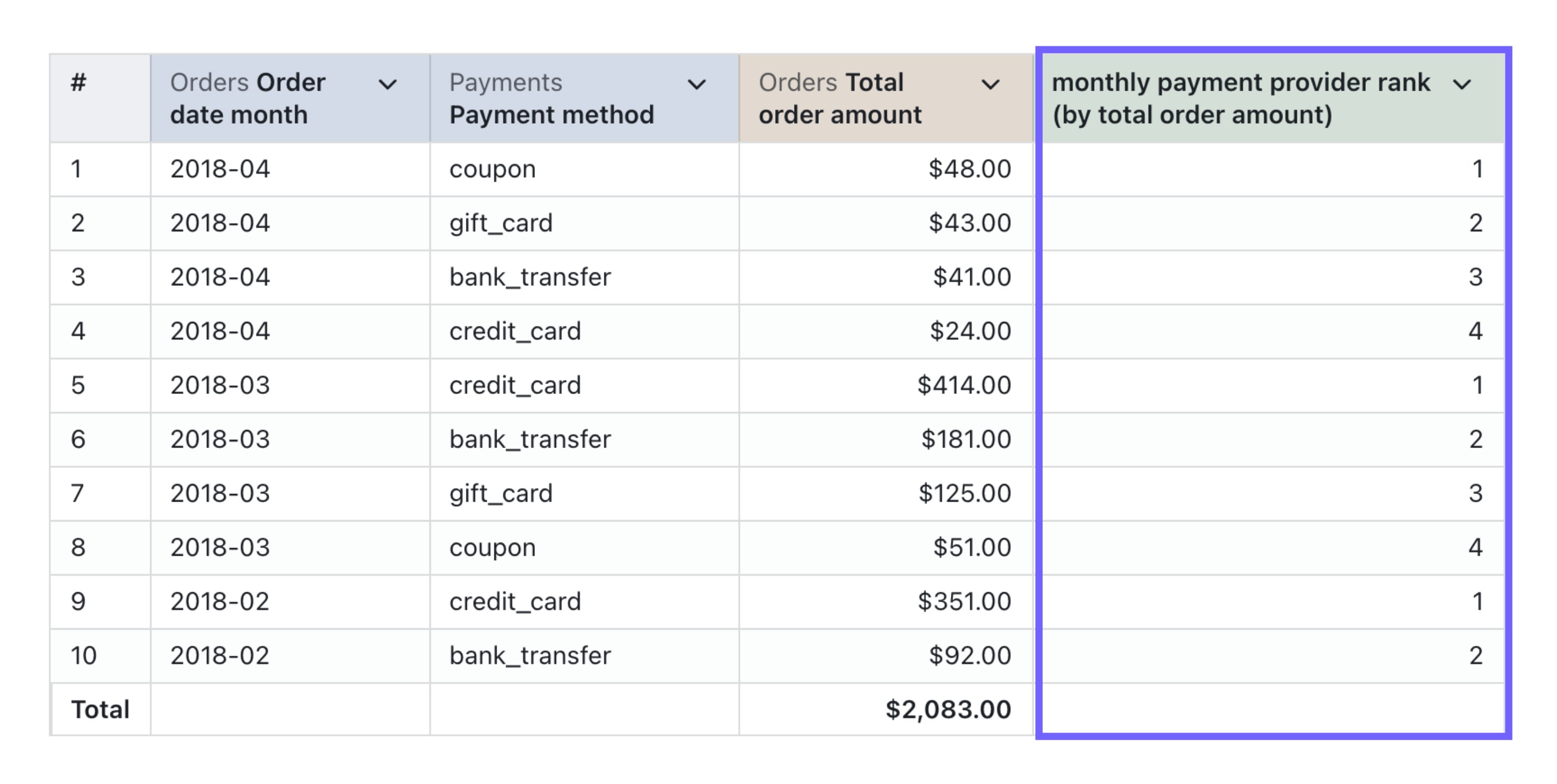
And here's the SQL used to generate it:
ROW_NUMBER() OVER (
  PARTITION BY
    ${orders.order_date_month}
  ORDER BY
    ${orders.total_order_amount} DESC
)
In general, the SQL used for calculating the rank in a column has just one important column and one other important parameter:
column_i_want_to_rank- this is the column that you want to rankASCandDESC- if you want to have the biggest values with rank = 1, then you need to addDESCto yourORDER BYclause. If you want the smallest values with rank = 1 then you can addASCto yourORDER BYclause (this isn't required, since the ordering isASCby default).
Here's the SQL you can copy-paste to calculate your rank in column
ROW_NUMBER() OVER (
  ORDER BY
    ${table.column_i_want_to_rank} DESC
)